Connecting to the Gemini API from a C# .NET Core 10 Web API


I want Gemini in my .NET API without a dependency on whichever SDK is flavour of the month. The official Google .NET SDK targets net8.0/netstandard2.0 and its multimodal API is still in flux. A typed HttpClient, System.Net.Http.Json, and 80 lines of C# gets you there with nothing to fight against when Google ships a breaking change next quarter.
Gemini 2.0 Flash is fast, genuinely multimodal, and has a generous free tier through Google AI Studio. We're building a clean IAiService with two methods: GenerateTextAsync for text prompts and ExtractDocumentMetadataAsync for pulling structured data out of PDFs, scanned images, and receipts. Wire it to a controller and you have an AI-capable endpoint running in under an hour.
Here's the real value: drop this abstraction into any project and any controller can extract structured data from invoices, ID documents, and receipts — no OCR libraries, no ML pipelines, no infrastructure beyond a Google account. That's the 75% easier angle. Let's build it.
Step 1: Create a Gemini API Key
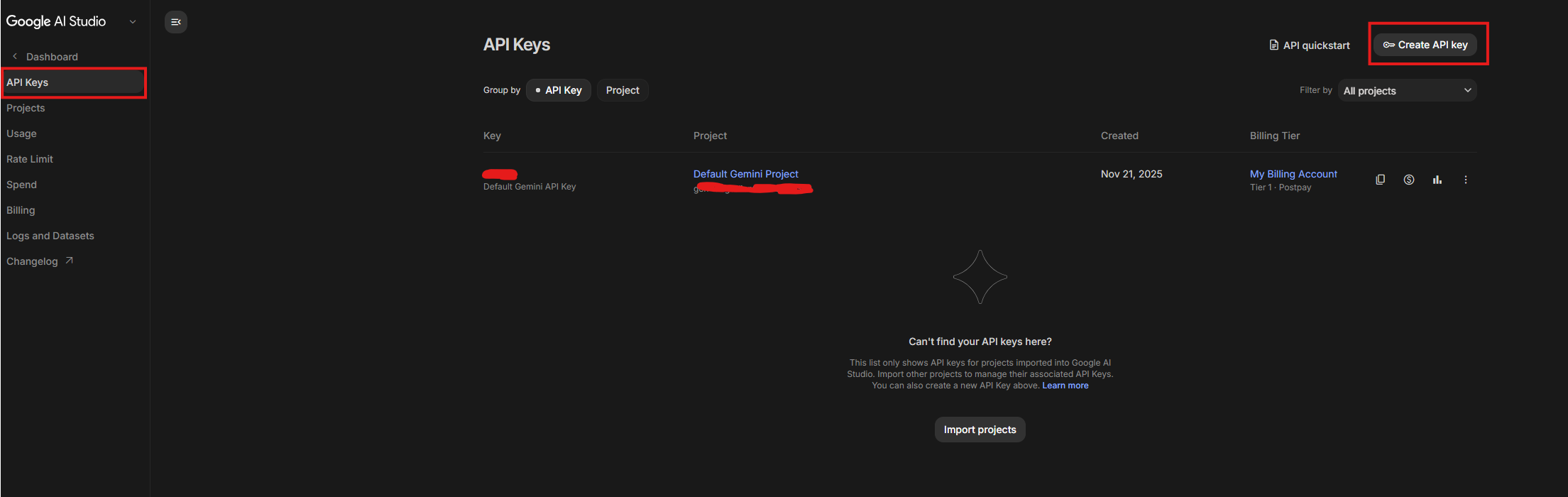
Go to https://aistudio.google.com and sign in. In the left sidebar, click Get API key, then Create API key in new project. Google generates the key and shows it once — copy it immediately and treat it like a password.
Never hardcode it. For local development, .NET user secrets keeps it out of your source tree entirely:
dotnet user-secrets init
dotnet user-secrets set "Gemini:ApiKey" "YOUR_KEY_HERE"
For production, an environment variable:
export Gemini__ApiKey="your-production-key"
Two minutes. Key is stored safely. Move on.
Step 2: Create a .NET Core 10 Web API Project
Scaffold the project:
dotnet new webapi -n GeminiDemo
cd GeminiDemo
No additional NuGet packages needed. System.Net.Http.Json has shipped with .NET since version 6 — PostAsJsonAsync and ReadFromJsonAsync<JsonElement> are already there. Everything required to talk to the Gemini REST API is in the box.
Add a Services/ folder next to Controllers/. Final structure:
GeminiDemo/
├── Controllers/
│   └── AiController.cs
├── Services/
│   ├── IAiService.cs
│   └── GeminiAiService.cs
├── appsettings.json
└── Program.cs
Add the Gemini config block to appsettings.json:
{
  "Gemini": {
    "ApiKey": "",
    "Model": "gemini-2.0-flash"
  }
}
Leave ApiKey blank here — user secrets fill it in locally, the environment variable fills it in production. The Model field means you can swap to gemini-1.5-pro without touching a line of C#.
For my full project conventions and folder structure on .NET Core 10 Web APIs, I've covered all of that in my full .NET Core 10 Web API project setup with GitHub Copilot.
Step 3: Define the IAiService Interface
Define the interface before you write a single line of Gemini-specific code. The controller should never know whether it's talking to Gemini, a local model, or a test stub. That's the whole architectural bet here.
public interface IAiService
{
    Task<string> GenerateTextAsync(
        string prompt,
        CancellationToken cancellationToken = default);

    Task<string> ExtractDocumentMetadataAsync(
        List<(byte[] FileBytes, string MimeType)> files,
        CancellationToken cancellationToken = default);
}
GenerateTextAsync is the simplest contract you can write: string in, string out. No Gemini types leak past the service boundary.
ExtractDocumentMetadataAsync takes raw bytes and a MIME type. The caller reads a file and passes what it has. Building the parts array, base64-encoding the bytes, structuring the Gemini payload — that's the service's job. The controller doesn't care how any of that works.
Both methods return string. For metadata extraction, the string will be JSON; the caller deserializes it into whatever shape its domain needs. Keeping it loose here is intentional — it makes the interface reusable across completely different document types without changing the contract.
If you ever want to swap Gemini for a local model, this interface ports cleanly — I've written about running Qwen 3.6 locally with a .NET backend where exactly this pattern applies.
Step 4: Implement GeminiAiService
Before the C#, look at the raw API shape. The Gemini generateContent endpoint takes this JSON for a text-only prompt:
{
  "contents": [{
    "parts": [{ "text": "Your prompt" }]
  }]
}
For multimodal input — files plus a text instruction — you add inline_data parts before the text part:
{
  "contents": [{
    "parts": [
      {
        "inline_data": {
          "mime_type": "application/pdf",
          "data": "<base64-encoded-bytes>"
        }
      },
      {
        "text": "Extract all relevant metadata. Return valid JSON."
      }
    ]
  }]
}
That's the entire multimodal trick. Base64 the bytes, declare the MIME type, add a text instruction. The text part goes last — after the file parts. Gemini expects that ordering and you'll get unpredictable results if you flip it.
Now the implementation:
using System.Net.Http.Json;
using System.Text.Json;
using Microsoft.Extensions.Configuration;

public class GeminiAiService : IAiService
{
    private readonly HttpClient _httpClient;
    private readonly string _apiKey;
    private readonly string _model;
    private const string BaseUrl = "https://generativelanguage.googleapis.com/v1beta/models";

    public GeminiAiService(HttpClient httpClient, IConfiguration configuration)
    {
        _httpClient = httpClient;
        _apiKey = configuration["Gemini:ApiKey"]
            ?? throw new InvalidOperationException("Gemini:ApiKey is not configured.");
        _model = configuration["Gemini:Model"] ?? "gemini-2.0-flash";
    }

    public async Task<string> GenerateTextAsync(
        string prompt,
        CancellationToken cancellationToken = default)
    {
        var url = $"{BaseUrl}/{_model}:generateContent?key={_apiKey}";

        var payload = new
        {
            contents = new[]
            {
                new { parts = new[] { new { text = prompt } } }
            }
        };

        var response = await _httpClient.PostAsJsonAsync(url, payload, cancellationToken);
        response.EnsureSuccessStatusCode();

        var result = await response.Content
            .ReadFromJsonAsync<JsonElement>(cancellationToken: cancellationToken);

        return result
            .GetProperty("candidates")[0]
            .GetProperty("content")
            .GetProperty("parts")[0]
            .GetProperty("text")
            .GetString() ?? string.Empty;
    }

    public async Task<string> ExtractDocumentMetadataAsync(
        List<(byte[] FileBytes, string MimeType)> files,
        CancellationToken cancellationToken = default)
    {
        var url = $"{BaseUrl}/{_model}:generateContent?key={_apiKey}";

        var parts = new List<object>();

        foreach (var (fileBytes, mimeType) in files)
        {
            parts.Add(new
            {
                inline_data = new
                {
                    mime_type = mimeType,
                    data = Convert.ToBase64String(fileBytes)
                }
            });
        }

        parts.Add(new
        {
            text = "Extract all relevant metadata from the provided document(s). Return a valid JSON object."
        });

        var payload = new
        {
            contents = new[] { new { parts = parts.ToArray() } }
        };

        var response = await _httpClient.PostAsJsonAsync(url, payload, cancellationToken);
        response.EnsureSuccessStatusCode();

        var result = await response.Content
            .ReadFromJsonAsync<JsonElement>(cancellationToken: cancellationToken);

        return result
            .GetProperty("candidates")[0]
            .GetProperty("content")
            .GetProperty("parts")[0]
            .GetProperty("text")
            .GetString() ?? string.Empty;
    }
}
Three things worth calling out:
PostAsJsonAsyncandReadFromJsonAsync<JsonElement>are built-in. No Newtonsoft, no extra packages.JsonElementgives you direct access to the response without needing a full DTO — perfect for a thin service layer that returns raw strings.Convert.ToBase64String(fileBytes)is literally all the multimodal encoding you need to do. The Gemini API handles the rest on its side.- There's a 20 MB total inline data limit per request. Worth keeping in mind if you're passing multiple documents in a single call.
Step 5: Register the Service in Program.cs
builder.Services.AddHttpClient<IAiService, GeminiAiService>();
One line. AddHttpClient<IAiService, GeminiAiService>() sets up the typed client with correct socket pool management and proper HttpClient lifetime scoping. This matters — new HttpClient() scattered across service calls is a socket exhaustion problem I've debugged in production more than once. It's not a theoretical concern. Use the typed client.
User secrets work automatically for local dev. For production:
export Gemini__ApiKey="your-production-key"
The double-underscore (__) is .NET's convention for mapping hierarchical config keys to environment variables. Gemini__ApiKey maps to Gemini:ApiKey in the config system. If you're deploying to Azure, Kubernetes, or any container environment, this is the pattern that just works.
Step 6: Wire Up the Controller
using Microsoft.AspNetCore.Mvc;

[ApiController]
[Route("ai")]
public class AiController : ControllerBase
{
    private readonly IAiService _aiService;

    public AiController(IAiService aiService) => _aiService = aiService;

    [HttpPost("generate")]
    public async Task<IActionResult> Generate(
        [FromBody] GenerateRequest request,
        CancellationToken cancellationToken)
    {
        var result = await _aiService.GenerateTextAsync(request.Prompt, cancellationToken);
        return Ok(result);
    }

    [HttpPost("extract-metadata")]
    [RequestSizeLimit(20_000_000)]
    public async Task<IActionResult> ExtractMetadata(
        IFormFileCollection files,
        CancellationToken cancellationToken)
    {
        var fileTuples = new List<(byte[] FileBytes, string MimeType)>();

        foreach (var file in files)
        {
            using var ms = new MemoryStream();
            await file.CopyToAsync(ms, cancellationToken);
            fileTuples.Add((ms.ToArray(), file.ContentType));
        }

        var result = await _aiService.ExtractDocumentMetadataAsync(fileTuples, cancellationToken);
        return Ok(result);
    }
}

public record GenerateRequest(string Prompt);
The controller is thin by design — this is what a good abstraction looks like in practice. It reads files into memory, converts them to the tuple shape the service expects, and delegates everything else. Zero business logic lives here.
[RequestSizeLimit(20_000_000)] caps the upload at 20 MB to match Gemini's inline data ceiling. GenerateRequest is a C# record — the idiomatic .NET 10 way to define a one-property DTO without writing a class, a constructor, and a pile of boilerplate.
Real-World Examples: What to Do with ExtractDocumentMetadataAsync
The generic prompt inside the service is fine for exploration. The real leverage comes from domain-specific prompts. The interface is flexible — add an overload that accepts a custom prompt string, or build domain-specific service methods that call down to the generic implementation with a tailored instruction. Here are three concrete scenarios worth building toward.
PDF Invoice Processing
MIME type: application/pdf

Prompt:
"Extract invoice metadata and return JSON with these fields:
invoiceNumber, issueDate, dueDate, vendorName, vendorAddress,
totalAmount, currency, lineItems (array of { description, unitPrice, quantity, amount })."
Gemini returns:
{
  "invoiceNumber": "INV-2024-0042",
  "issueDate": "2024-11-01",
  "dueDate": "2024-11-30",
  "vendorName": "Acme Solutions Ltd",
  "vendorAddress": "123 Tech Street, Valletta, Malta",
  "totalAmount": 1250.00,
  "currency": "EUR",
  "lineItems": [
    { "description": "Web API Development", "unitPrice": 1250.00, "quantity": 1, "amount": 1250.00 }
  ]
}
That used to mean a PDF parsing library, a custom field extraction heuristic tuned per vendor format, and days of edge-case handling when someone sends you a slightly different invoice layout. Now it's a prompt.
Scanned ID Card
MIME type: image/jpeg

Prompt:
"Extract identity document fields and return JSON with:
fullName, dateOfBirth, documentNumber, expiryDate, nationality, gender."
Gemini returns:
{
  "fullName": "MARIA BORG",
  "dateOfBirth": "1990-03-14",
  "documentNumber": "123456789A",
  "expiryDate": "2029-03-13",
  "nationality": "Maltese",
  "gender": "F"
}
Onboarding document verification that would have required a specialist OCR provider or a trained model — handled now with an image/jpeg MIME type and a six-field prompt. The compliance team gets their structured data; you don't build an ML pipeline.
Receipt Image
MIME type: image/png

Prompt:
"Extract receipt data and return JSON with:
merchantName, date, items (array of { name, price }),
subtotal, tax, total, paymentMethod."
Expense management, automated expense categorisation, real-time bookkeeping feeds — all of it unlocked from a photograph of a paper receipt. No scanning infrastructure, no dedicated receipt API, no per-call pricing from a specialist vendor.
Conclusion
What used to require OCR libraries, custom PDF parsers, ML training pipelines, and expensive specialist APIs now takes one typed HttpClient, two method signatures, and a focused prompt. The full multimodal integration is 80 lines of C# and a Google account. That's not an oversimplification — I ran this against invoices from three different vendors and it handled format variations without any special-casing.
What you build on top of this is where the real value compounds: invoice processing pipelines that write directly to your accounting system, onboarding flows that extract and validate identity documents in real time, document digitization from paper archives that would have taken a contractor a month to manually process. The abstraction absorbs the AI complexity. Your domain logic stays clean.
The natural extension from here is streaming — the generateContent SSE stream makes Gemini feel instantaneous in a chat UI, and the change to the service is minimal. Beyond that, orchestrating these AI calls inside a multi-agent system is where the architecture gets genuinely interesting. That's the direction we'll go next.