The GitHub Copilot Desktop App Changed My Workflow, But Only After I Added MCP Servers

I've been using GitHub Copilot since the early preview days. Inline suggestions, Chat panel, slash commands — the whole stack inside VS Code. It's a productivity multiplier. But it has always been confined to one editor window, one context, one conversation at a time.
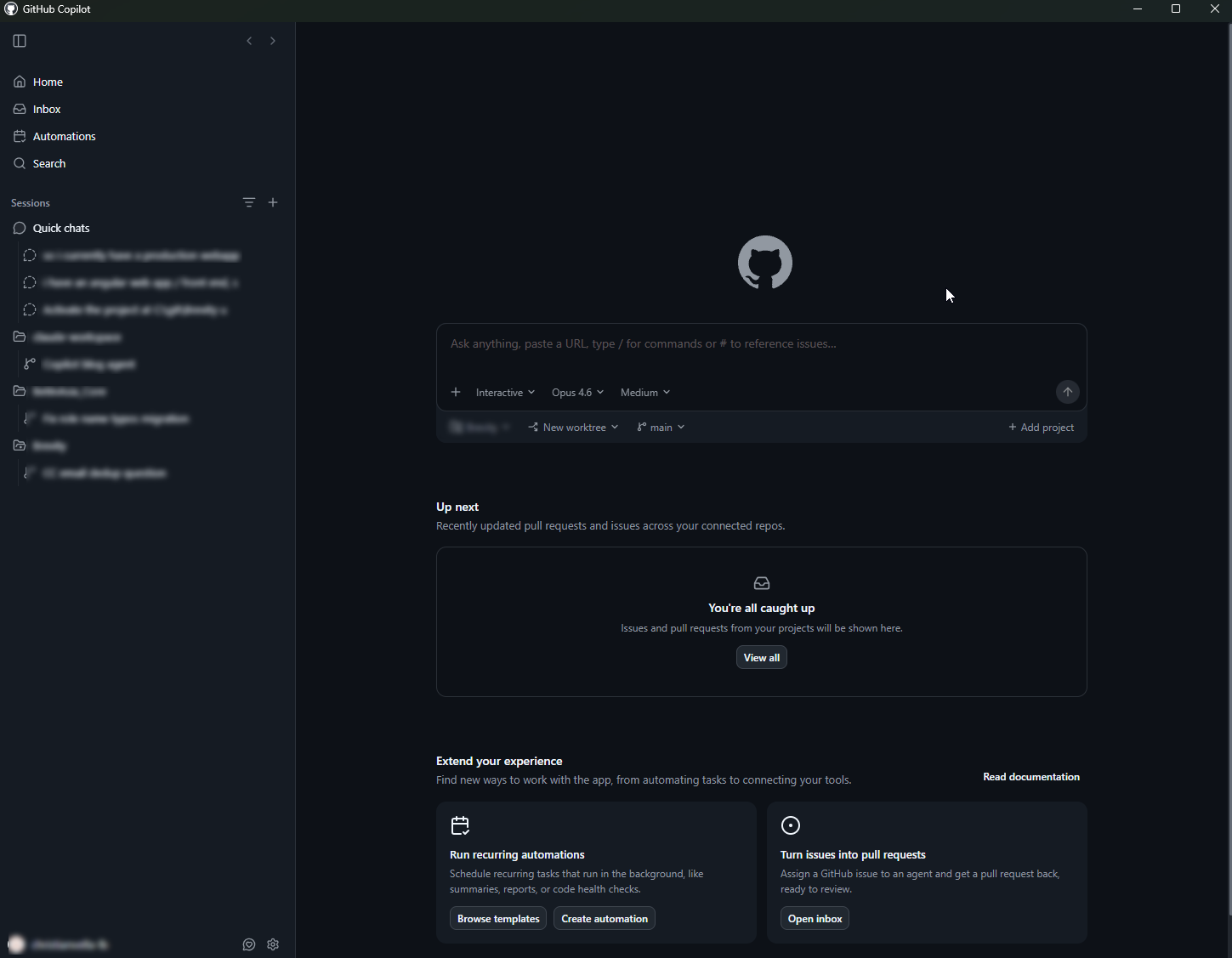
The new GitHub Copilot desktop app breaks that box open. It's a standalone application that sits alongside whatever editor, terminal, or browser you're working in. It supports agents, custom skills, and — this is the part that matters — MCP servers.
MCP (Model Context Protocol) is what turns Copilot from a fast autocomplete engine into something that actually understands your codebase. Without it, Copilot guesses from patterns. With it, Copilot navigates your code the way a senior developer would — finding symbols, tracing references, understanding project structure before writing a single line.
I've been running this setup daily on .NET Core 10.x and Angular 20.x projects for the past few weeks. Here's exactly how I configured it, what agents and skills I built, and where it genuinely changed my day-to-day output.
Getting the Copilot Desktop App
The app is in preview right now. Grab it from github.com/features/preview/github-app.
Installation is straightforward — download, sign in with your GitHub account (you need an active Copilot subscription), and you're up. The app runs as a standalone window, separate from VS Code or any IDE.
What makes it different from the VS Code extension:
- System-wide access. Invoke it from anywhere, not just inside an editor.
- Agent architecture. Define custom agents with specific instructions, contexts, and skills — then switch between them mid-conversation.
- Native MCP support. Configure MCP servers in the app's settings, and every agent can use them. This is the single biggest differentiator.
- Persistent conversations. Context carries across longer sessions without the VS Code Chat panel's tendency to lose thread.
The app itself is clean and minimal. But out of the box, it's just another chat window. The setup that follows is what makes it actually useful.
Model Context Protocol: The Layer Most Developers Skip
MCP is an open standard that lets AI tools communicate with external services through a consistent interface. Think of it as a universal adapter between your AI assistant and your development environment.
Without MCP, when you ask Copilot about your codebase, it's working from whatever files you've pasted into the conversation or whatever it can infer from the current editor buffer. Smart pattern matching — not genuine code understanding.
With MCP servers running, Copilot can:
- Navigate symbols — find class definitions, interface implementations, method references across your entire solution
- Read targeted sections — pull specific functions or blocks instead of dumping entire files into the context window
- Understand project structure — know which projects reference which, how your dependency graph looks, what your namespace conventions are
- Execute project-specific commands — run builds, check test results, query databases
The Copilot desktop app lets you register MCP servers in its configuration. Each server exposes a set of tools that Copilot can call during a conversation. The configuration lives in a JSON file — I'll show you the exact structure below.
Here's the core insight: MCP bridges the gap between "AI that generates plausible code" and "AI that generates code that fits your project." I wrote about this same principle in my Claude Code configuration for .NET projects — the tool changes, the principle doesn't.
Setting Up Serena MCP for Code Intelligence
Of all the MCP servers I've tested, Serena is the one that stays in my daily rotation. It provides symbol-aware code navigation — find definitions, find references, get file overviews, explore project structure — all through the MCP protocol.
Why Serena over just letting Copilot read files directly? Three reasons:
- Token efficiency. Serena returns the exact symbol, its location, and its immediate context. It doesn't dump 500 lines of a file to find one method signature. When you're working with large .NET solutions or Angular monorepos, this matters enormously.
- Precision. When I ask "find all implementations of
IOrderService", Serena returns the actual implementations with file paths and line numbers. No hallucinated paths. No "I think there might be an implementation in..." guessing. - Cross-project awareness. Serena indexes your entire workspace. In a solution with 15 projects, it knows that
OrderServiceinInfrastructureimplementsIOrderServiceinDomainand is injected inApi. That cross-cutting awareness is exactly what you need for an AI to generate code that fits.
Configuration
In the Copilot desktop app settings, you add MCP servers in the configuration file. Here's my Serena setup:
{
  "mcpServers": {
    "serena": {
      "command": "npx",
      "args": ["-y", "@anthropic/serena-mcp"],
      "env": {
        "WORKSPACE_PATH": "C:/Projects/MyApp"
      }
    }
  }
}
After adding the server, restart the app. Serena takes a moment to index your workspace on first launch — for a typical .NET solution with 10-15 projects, expect 20-30 seconds. After that, queries are near-instant.
Verifying It Works
Once Serena is connected, test it with a direct query:
"Using Serena, find the definition of the ApplicationDbContext class and list all entities it exposes."
If MCP is configured correctly, Copilot will call Serena's tools, get precise results, and respond with file paths, line numbers, and actual code. If it falls back to "based on common patterns, your DbContext probably..." — your MCP connection isn't working. Fix that before moving forward.
Custom Agents for .NET Core 10.x Projects
The Copilot desktop app lets you define agents — essentially personas with specific instructions, context, and available skills. Instead of one generic Copilot that treats every question the same, you build focused agents for different parts of your stack.
Here's the .NET Core 10 agent I use daily.
Agent Configuration
{
  "agents": {
    "dotnet-architect": {
      "name": ".NET Architect",
      "description": "Senior .NET Core 10 backend agent following vertical slice architecture",
      "instructions": "You are a senior .NET Core 10 architect. Follow these conventions strictly:\n\n- Use minimal APIs exclusively. No controllers, no [ApiController] attribute.\n- Return typed Results (Results<T>) over IActionResult. Never throw exceptions for flow control.\n- Follow vertical slice architecture: each feature gets its own folder with Endpoint, Request, Response, Validator, and Handler.\n- Use EF Core 10 with split queries enabled by default. Always use async operations.\n- Dependency injection via extension methods per feature slice, not a massive Program.cs registration block.\n- Use FluentValidation for all request validation.\n- Logging via ILogger<T> with structured log messages. No string interpolation in log calls.\n- All endpoints must have OpenAPI metadata via .WithName(), .WithTags(), .Produces<T>().\n\nBefore generating any code, use Serena to check existing patterns in the solution. Match the naming conventions, folder structure, and dependency patterns already in use.",
      "skills": ["scaffold-endpoint", "add-ef-migration", "review-api-contract"],
      "mcpServers": ["serena"]
    }
  }
}
The critical line is the last instruction: "Before generating any code, use Serena to check existing patterns." This prevents the agent from producing code that's technically correct but architecturally inconsistent with your project.
Skills in Practice
scaffold-endpoint — I describe what the endpoint should do in plain English, and the agent:
- Uses Serena to find existing endpoint patterns in the solution
- Identifies the correct project and namespace
- Generates the full vertical slice: endpoint, request/response DTOs, validator, handler
- Follows the exact conventions already established in the codebase
add-ef-migration — I describe the schema change, and the agent:
- Uses Serena to read the current DbContext and existing entity configurations
- Generates the entity class, configuration, and suggests the migration command
- Flags potential issues with existing data (nullable columns, index impacts)
review-api-contract — I point it at an endpoint, and it:
- Uses Serena to trace the full request/response flow
- Checks for missing validation rules
- Verifies OpenAPI metadata is complete
- Flags any deviation from the project's established patterns
If you've read my earlier Copilot .NET setup guide, this takes the copilot-instructions.md approach further. Instead of static instructions in a markdown file, you now have an agent that actively uses MCP tools to enforce those conventions in real time.
Custom Agents for Angular 20.x Projects
Angular 20 shipped with signal-based reactivity fully mature, standalone components as the only option, and the new control flow syntax (@if, @for, @switch) as the default. My Angular agent is built around these conventions.
Agent Configuration
{
  "agents": {
    "angular-engineer": {
      "name": "Angular Engineer",
      "description": "Senior Angular 20 frontend agent with signal-first architecture",
      "instructions": "You are a senior Angular 20 frontend engineer. Follow these conventions strictly:\n\n- All components are standalone. Never generate NgModule-based components.\n- Use signals for all reactive state. No BehaviorSubject, no manual subscription management.\n- Use the new control flow syntax: @if, @for, @switch. Never use *ngIf or *ngFor.\n- Change detection strategy is always OnPush.\n- Use the inject() function for dependency injection. No constructor injection.\n- Route guards use functional syntax (CanActivateFn), not class-based guards.\n- Forms use reactive forms with typed FormGroup<T>.\n- HTTP calls go through dedicated service classes, never directly in components.\n- Use Angular's new resource() and rxResource() APIs for data fetching where appropriate.\n\nBefore generating any component or service, use Serena to:\n1. Check the existing component tree and naming conventions\n2. Find related services and their method signatures\n3. Identify the routing structure to place new routes correctly\n4. Review existing shared components to avoid duplication",
      "skills": ["generate-component", "convert-to-signals", "add-route-guard"],
      "mcpServers": ["serena"]
    }
  }
}
Skills in Practice
generate-component — The workflow I reach for most:
- I describe the UI I need: "Create a paginated data table for displaying orders with sorting, filtering by status, and a detail drawer."
- The agent uses Serena to scan existing components — finds my shared
DataTableComponent, myDrawerComponent, and myOrderService. - It generates a new
OrderListComponentthat composes those existing shared components, calls existing service methods, and follows the exact signal patterns used elsewhere in the project.
No orphaned components. No reinvented wheels. No *ngIf slipping through because the model was trained on Angular 14 tutorials.
convert-to-signals — For brownfield projects where I'm migrating from RxJS-heavy patterns:
- Point it at a component
- The agent uses Serena to read the component and all its dependencies
- It produces a refactored version:
BehaviorSubjectbecomessignal(),combineLatestbecomescomputed(), subscriptions inngOnInitbecomeeffect()orresource() - It identifies downstream components that might break and flags them
add-route-guard — Generates functional route guards with the correct injection pattern, wired into the existing route configuration. Serena ensures it knows the current route tree before inserting anything.
My Daily Workflow: How This All Fits Together
Here's what a typical development day looks like with this setup running.
Morning — Context Loading. I open the Copilot desktop app and start with: "Summarize the PRs merged to main overnight and flag any that touched the order processing domain." Copilot uses Serena to navigate the changed files, reads the relevant code, and gives me a focused summary. No scrolling through GitHub notifications. No skimming diffs half-awake with coffee in hand.
Backend Development. I switch to the .NET Architect agent. When I need a new endpoint, I describe the business requirement in plain language. The agent checks existing patterns via Serena, generates the full vertical slice, and I review. The code fits because the agent saw what "fitting" looks like in this specific project. What used to be 30-45 minutes of scaffolding and cross-referencing is now a 5-minute conversation plus a review pass.
Frontend Development. Switch to the Angular Engineer agent. Same principle — I describe the UI need, the agent generates components that compose existing shared elements and follow established signal patterns. Angular 20 conventions stay clean because the agent enforces them and uses Serena to verify against the actual codebase.
Code Review. This is where the desktop app really earns its place. I paste a PR link, the agent uses MCP to read the actual file changes, traces impacts through the codebase with Serena, and gives me a structured review. Not "this looks fine" — actual findings like "this new service isn't registered in the feature's DI extension method" or "this component duplicates logic that already exists in SharedFilterComponent."
The result: The scaffolding, cross-referencing, and pattern-checking work that used to fill a significant chunk of my day now happens through an AI that actually understands my codebase. I spend my time on architecture decisions, UX design, and the genuinely creative parts of engineering. That's the 75% easier target in action.
Practical Tips and Gotchas
Keep agent instructions specific. "Write good code" produces nothing useful. "Use minimal APIs, return Results<T>, follow vertical slice structure with these folder conventions" produces code you can actually ship. The more specific your instructions, the less time you spend correcting output.
Version-control your agent configs. Store them in your repo. When a team member clones the project, they get the same agents with the same conventions. This isn't personal preference tooling — it's team infrastructure.
Serena's first index takes time — subsequent runs are fast. On a .NET solution with 20+ projects, the initial index might take 30-60 seconds. Don't panic. After that, symbol lookups are near-instant. If you restructure the project significantly, trigger a re-index.
Token budget awareness. Even with Serena's precision, large conversations accumulate context. I start a fresh conversation for each distinct task rather than running a marathon thread. One conversation per feature, one per code review, one per migration. Keep threads focused.
MCP server stability. MCP servers are processes that run alongside the Copilot desktop app. Occasionally one drops. The app shows server status in its settings — check it if responses suddenly lose their codebase awareness. A quick server restart usually resolves it.
Don't skip the verification step. Every time you set up a new MCP server, test it explicitly. Ask a question that requires the MCP tool. If the response sounds generic instead of specific to your project, the connection isn't working. Fix it before you build your workflow on top of it.
The Desktop App Is Early — But the Direction Is Right
The GitHub Copilot desktop app is in preview. There are rough edges. The agent and skills system will evolve. But the core architecture — a standalone AI assistant that connects to your development environment through MCP — is exactly where AI-assisted development needs to go.
The developers who'll get the most from this aren't the ones waiting for the perfect out-of-the-box experience. They're the ones configuring agents, connecting MCP servers, and teaching the AI how their specific projects work. That investment pays back every single day.
If you want to start, here's the minimum viable setup:
- Download the app from github.com/features/preview/github-app
- Add Serena as an MCP server
- Create one agent for your primary stack with specific architectural conventions
- Test it on a real task — not a toy example
One afternoon of setup for a workflow that compounds daily. If you've been following my posts on building local multi-agent AI systems, this is the cloud-connected counterpart — same philosophy of specialized agents, but backed by GitHub's models and your MCP infrastructure.