Run a Full Multi-Agent AI System Locally on Windows: LangChain + LM Studio + Qwen 3

Every time I paste a snippet into ChatGPT or Claude, I'm sending proprietary code to a third-party server. That's a non-starter for client work. Add the per-token costs once your usage scales, and the internet dependency when you're travelling — or just in a hotel in Gozo with questionable Wi-Fi — and you've got three solid reasons to go local.
Here's what we're building: a multi-agent AI dev team that runs entirely on your Windows machine. One Orchestrator that reads your intent and dispatches to the right specialist — a C# senior engineer, an Angular front-end designer, an automation test writer, or a code reviewer. All of it backed by Qwen 3, a 6B-parameter model that punches well above its weight on code tasks. No cloud. No API costs. No code leaving your machine.
What you need before we start:
- Windows 10 or 11 (64-bit)
- Python 3.10 or newer
- ~8 GB free disk space for the model
- A GPU with 6–8 GB VRAM is ideal — but a modern CPU with 16 GB RAM will get you there
Let's build it.
What Is LM Studio and Why Qwen 3?
LM Studio is a local model runner for Windows, macOS, and Linux. Its killer feature for our purposes is the built-in OpenAI-compatible REST server. You load a model, toggle the server on, and it exposes endpoints at http://localhost:1234/v1 — the same shape as the OpenAI API. LangChain already knows how to talk to OpenAI, so wiring it to a local model is almost zero effort.
Why Qwen 3? Alibaba's Qwen 3 family is genuinely strong on instruction following and code generation for its size class. The 6B instruct variant fits comfortably in 6–8 GB VRAM with Q4 quantisation, or runs on CPU-only machines if you have 16 GB of system RAM and some patience.
Which quantisation to pick: Search for Qwen3 in LM Studio's model browser. You'll see several quantisation options. My recommendation:
- Q4_K_M — the right call for most consumer GPUs and CPU-only setups. Best balance of speed and quality.
- Q8_0 — if you have 16 GB VRAM and want near-FP16 quality
- Q2_K — only if you're heavily RAM-constrained; quality noticeably degrades on code tasks
Installing and Configuring LM Studio on Windows
Download and install from lmstudio.ai. Standard Windows .exe — next, next, done.
Load the model:
- Open LM Studio and click the Search icon (magnifying glass) in the left sidebar
- Type
Qwen3in the search bar - Find the latest
Qwen3-6B-Instructvariant — look for GGUF format entries - Click Download on your chosen quantisation (Q4_K_M is the one)
- Once downloaded, click Load Model — watch memory usage climb as it maps into RAM/VRAM
Enable the local API server:
- Click the Developer icon (
</>) in the left sidebar - Toggle Start Server on
- Confirm the server is running at
http://localhost:1234 - Note the model identifier shown in the server panel — you'll need this in your config shortly
Two settings to check before moving on:
- Context Length: Set to at least
8192. Agents handling real code blocks need the headroom. - GPU Offload Layers: Drag to maximum. Every layer pushed to GPU means faster inference. Leave everything else as defaults.
Verify the server is alive. Open PowerShell and run:
# Quick sanity check — PowerShell
Invoke-RestMethod -Uri "http://localhost:1234/v1/models" -Method GET
You should see a JSON response listing your loaded Qwen 3 model. Connection error? Check that the server toggle is on and LM Studio is still in the foreground.
Setting Up Your Python Environment
Keep it clean — use a virtual environment.
# Create and activate a virtual environment
python -m venv .venv
.venv\Scripts\activate

# Install dependencies
pip install langchain langchain-openai langchain-core openai python-dotenv
Create a .env file in your project root:
# .env
OPENAI_API_BASE=http://localhost:1234/v1
OPENAI_API_KEY=lm-studio
MODEL_NAME=qwen3-6b-instruct
Three things worth understanding here:
OPENAI_API_BASEredirects the OpenAI client to LM Studio instead of OpenAI's servers — that's the entire trickOPENAI_API_KEYcan be any non-empty string; LM Studio doesn't validate it, but the client library requires a valueMODEL_NAMEmust match the identifier shown in LM Studio's server panel exactly — it's case-sensitive, and it often includes a path prefix (likelmstudio-community/Qwen3-6B-Instruct-GGUF). Copy it from the UI rather than guessing.
Connecting LangChain to LM Studio
Before touching the multi-agent system, prove the connection works with the simplest possible call. Don't skip this step.
# connection_test.py
from langchain_openai import ChatOpenAI
from langchain_core.messages import HumanMessage
import os
from dotenv import load_dotenv

load_dotenv()

llm = ChatOpenAI(
    base_url=os.getenv("OPENAI_API_BASE"),
    api_key=os.getenv("OPENAI_API_KEY"),
    model=os.getenv("MODEL_NAME"),
    temperature=0.2,
)

response = llm.invoke([HumanMessage(content="Write a C# method that reverses a string.")])
print(response.content)
Run it. C# method back — pipe works. 404 or model name error — open LM Studio's Developer tab, copy the exact model identifier, and update MODEL_NAME in your .env.
temperature=0.2 is my default for code work. Lower temperature means less creative variation, more deterministic output — exactly what you want when the code needs to compile.
Designing the Multi-Agent System
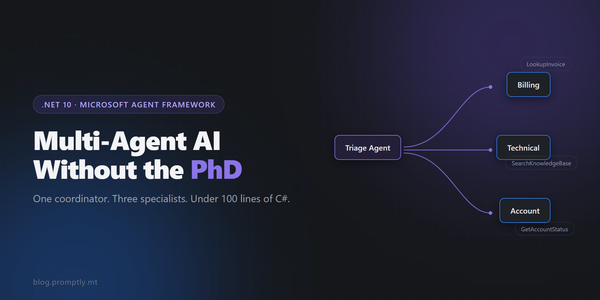
Here's the architecture:
User Prompt
     │
     ▼
┌─────────────────┐
│   Orchestrator  │  ← classifies intent, routes task
└────────┬────────┘
         │
    ┌────┴─────────────────────────────────┐
    │             │            │           │
    ▼             ▼            ▼           ▼
┌────────┐  ┌─────────┐  ┌────────┐  ┌──────────┐
│  C#    │  │ Angular │  │  Test  │  │  Code    │
│ Coding │  │ Design  │  │ Writer │  │ Reviewer │
│ Agent  │  │  Agent  │  │ Agent  │  │  Agent   │
└────────┘  └─────────┘  └────────┘  └──────────┘
         │             │            │           │
         └─────────────┴────────────┴───────────┘
                              │
                              ▼
                       Response to User
The key insight: every agent shares the same Qwen 3 model instance. What makes each one a "specialist" is its system prompt — not a different model. The system prompt IS the agent's expertise. Get the prompt right and you get a different engineer.
The Orchestrator's only job is to read intent and return a structured routing decision. It never answers the question itself — it dispatches.
Implementing the Agents
Here's the full implementation. Save this as agents.py:
# agents.py
import os
import json
from dotenv import load_dotenv
from langchain_openai import ChatOpenAI
from langchain_core.prompts import ChatPromptTemplate
from langchain_core.output_parsers import StrOutputParser

load_dotenv()

# ─── Shared LLM instance ──────────────────────────────────────────────────────
# All agents share one connection to LM Studio.
# Differentiation is entirely in the system prompts.

llm = ChatOpenAI(
    base_url=os.getenv("OPENAI_API_BASE"),
    api_key=os.getenv("OPENAI_API_KEY"),
    model=os.getenv("MODEL_NAME"),
    temperature=0.2,
)

def make_chain(system_prompt: str) -> object:
    """Build a simple prompt → LLM → string output chain."""
    prompt = ChatPromptTemplate.from_messages([
        ("system", system_prompt),
        ("human", "{task}"),
    ])
    return prompt | llm | StrOutputParser()


# ─── Specialist Agent Definitions ─────────────────────────────────────────────

# 1. C# Senior-Level Coding Agent
csharp_agent = make_chain("""
You are a senior C# engineer with 15+ years of experience on .NET Core and .NET 8+.
You write idiomatic, production-grade C# that follows SOLID principles.
You use modern language features (records, pattern matching, nullable reference types, async/await).
You never write boilerplate noise — every line earns its place.
When you return code, include a brief explanation of the key decisions made.
Format: code block first, then a short explanation. No padding.
""")

# 2. Angular + CSS Front-End Designer Agent
angular_agent = make_chain("""
You are a senior Angular developer and UI designer specialising in Angular 17+ with TypeScript and SCSS.
You write pixel-perfect, accessible components that follow Angular best practices:
standalone components, signals for state, OnPush change detection.
Your SCSS is clean — no magic numbers, proper use of variables and mixins.
You think about keyboard accessibility and ARIA attributes without being reminded.
Format: TypeScript component first, then SCSS, then a brief note on any design decisions.
""")

# 3. Automation Test Writer Agent
test_agent = make_chain("""
You are a test-first engineer who writes thorough, maintainable test suites.
For C# code: use xUnit with FluentAssertions. Mock dependencies with NSubstitute.
For Angular code: use Jasmine/Karma for unit tests, Playwright for E2E when appropriate.
You always cover: happy path, edge cases, null/empty inputs, and boundary conditions.
Write tests that document intent — the test name should read like a specification.
Format: test file content only. No filler commentary outside of test names and inline comments.
""")

# 4. Code Review & Performance Agent
review_agent = make_chain("""
You are a critical but constructive code reviewer focused on .NET Core and Angular codebases.
You identify: performance bottlenecks (N+1 queries, unnecessary allocations, blocking async calls),
security antipatterns (injection risks, improper input validation, exposed secrets),
and readability issues (overly complex logic, poor naming, missing null guards).
Label every finding with severity: [HIGH], [MEDIUM], or [LOW].
Format your review as a numbered list. End with a brief overall assessment (1-2 sentences).
""")

# 5. Orchestrator Agent
ORCHESTRATOR_SYSTEM = """
You are a routing orchestrator. Your ONLY job is to read the user's task and determine
which specialist agent should handle it. You do not answer the task yourself.

The available agents are:
- csharp: For writing, modifying, or explaining C# and .NET code
- angular: For writing Angular components, TypeScript, or CSS/SCSS UI work
- testing: For writing unit tests, integration tests, or E2E tests for any code
- review: For reviewing, auditing, or analysing existing code for quality or performance

Respond with ONLY a valid JSON object in this exact format:
{"agent": "<agent_name>", "reason": "<one sentence explanation>"}

If the task is ambiguous, pick the most likely agent and explain your reasoning.
"""

orchestrator_prompt = ChatPromptTemplate.from_messages([
    ("system", ORCHESTRATOR_SYSTEM),
    ("human", "{task}"),
])
orchestrator_chain = orchestrator_prompt | llm | StrOutputParser()

AGENT_MAP = {
    "csharp": csharp_agent,
    "angular": angular_agent,
    "testing": test_agent,
    "review": review_agent,
}


# ─── Pipeline Runner ───────────────────────────────────────────────────────────

def run_pipeline(user_prompt: str) -> dict:
    """
    Route user_prompt through the orchestrator and dispatch to the
    appropriate specialist agent. Returns a dict with routing info and result.
    """
    print(f"\n[Orchestrator] Analysing task...")
    raw_routing = orchestrator_chain.invoke({"task": user_prompt})

    # Parse the routing decision
    try:
        routing = json.loads(raw_routing.strip())
        agent_name = routing.get("agent", "").lower()
        reason = routing.get("reason", "No reason provided")
    except json.JSONDecodeError:
        # Fallback: try to find an agent name in the raw response
        agent_name = "csharp"  # safe default
        reason = f"Parsing failed; defaulted to csharp. Raw: {raw_routing}"

    print(f"[Orchestrator] Routing to: {agent_name.upper()} agent")
    print(f"[Orchestrator] Reason: {reason}")

    if agent_name not in AGENT_MAP:
        return {
            "agent": agent_name,
            "reason": reason,
            "result": f"Unknown agent '{agent_name}'. Available: {list(AGENT_MAP.keys())}",
        }

    specialist = AGENT_MAP[agent_name]
    print(f"\n[{agent_name.upper()} Agent] Working...\n")
    result = specialist.invoke({"task": user_prompt})

    return {
        "agent": agent_name,
        "reason": reason,
        "result": result,
    }
The Orchestrator in Action
The routing logic is deliberately simple. The Orchestrator gets a system prompt, four named buckets, and an instruction to return JSON. No complex decision tree — just a well-prompted model making a classification call.
For 80% of real dev tasks, four buckets is all you need. A future upgrade with LangGraph would let agents hand off to each other — write code, automatically test it, automatically review it, all in one graph traversal. But that's a follow-up post. Start simple, prove value, then layer in complexity.
Putting It All Together
Save this as main.py alongside agents.py:
# main.py
from agents import run_pipeline

if __name__ == "__main__":
    # Example 1: C# task
    print("=" * 60)
    print("EXAMPLE 1: C# Task")
    print("=" * 60)
    output = run_pipeline(
        "Write a C# extension method to chunk a List<T> into batches of a given size."
    )
    print(output["result"])

    # Example 2: Angular task
    print("\n" + "=" * 60)
    print("EXAMPLE 2: Angular Task")
    print("=" * 60)
    output = run_pipeline(
        "Build an Angular search input component with 300ms debounce using RxJS."
    )
    print(output["result"])

    # Example 3: Code review task
    print("\n" + "=" * 60)
    print("EXAMPLE 3: Code Review Task")
    print("=" * 60)
    output = run_pipeline(
        """Review this C# repository pattern implementation for performance issues:

public class UserRepository
{
    private readonly AppDbContext _context;
    public UserRepository(AppDbContext context) => _context = context;

    public List<User> GetActiveUsers()
    {
        return _context.Users
            .Where(u => u.IsActive)
            .ToList();
    }

    public List<Order> GetOrdersForUser(int userId)
    {
        return _context.Orders
            .Where(o => o.UserId == userId)
            .ToList();
    }
}"""
    )
    print(output["result"])
Run it:
python main.py
What to expect on performance:
- With GPU (6+ GB VRAM, Q4_K_M): First token in 1–3 seconds, full response in 10–30 seconds depending on output length
- CPU only (16 GB RAM, Q4_K_M): First token in 5–15 seconds, full response in 1–4 minutes
CPU mode is fine for batch runs you kick off and walk away from. For interactive back-and-forth during a coding session, a GPU makes the difference between useful and annoying.
What to Do Next
This system is useful today. Here's the clear upgrade path when you're ready for more:
Add LangGraph for stateful multi-step pipelines. Define a workflow graph where the C# Agent writes code, the Test Writer automatically covers it, and the Code Reviewer flags issues — all in one triggered run. No manual chaining required.
Add a RAG layer using Chroma or FAISS. Embed your own codebase into a local vector store and point agents at it. When the C# agent needs context about your existing architecture or conventions, it retrieves it rather than hallucinating something generic.
Bind specialist agents to domain-specific models as the local AI ecosystem matures. LM Studio can run multiple models simultaneously (hardware permitting). A fine-tuned coding model for the C# agent and a smaller, faster model for the orchestrator's routing decision is a natural split.
Closing
A full specialist AI dev team — C# engineer, Angular designer, test writer, code reviewer — running privately on your Windows machine in roughly 200 lines of Python. Zero per-token cost. Zero internet required. Your code never leaves the box.
That's the 75% reduction that matters here: you stop manually routing tasks between tools, stop paying per token, stop worrying about what gets logged server-side. You describe the task, the orchestrator picks the right expert, and you get a production-quality response.
Try it. Then extend it. What specialist agent do you add next — drop a comment below.
Built with LM Studio, Qwen 3 (6B), LangChain, and Python 3.10+ on Windows. All inference runs locally.