Stop Bloating Your System Prompts: Agent Skills for .NET Goes Stable

Your agent started with a tidy 300-token system prompt. Six months later it's 9,000 tokens. Legal added the compliance rules, Support pasted in the escalation playbook, Finance dropped the entire expense policy on top. I've watched this happen on two projects now. Nobody plans it. It just accretes.
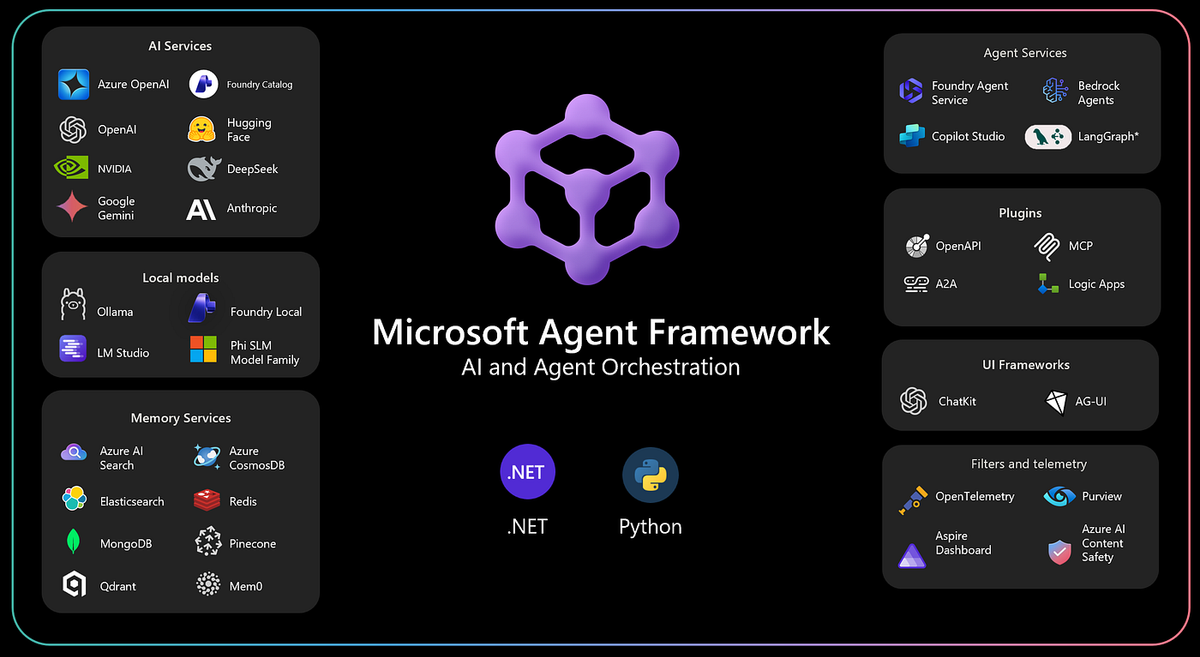
So every request ships kilobytes of instructions the model ignores 95% of the time. As of this week there's a first-party fix: Agent Skills for .NET in the Microsoft Agent Framework is now stable. The [Experimental] attribute is gone and the API is cleared for real workloads.
Before the fix, let's be honest about what the bloated prompt actually costs you:
- Money. Those 9,000 tokens ride along on every call, every user, every day. You're paying for the expense policy on password reset questions.
- Quality. Instruction dilution is real. The more rules you cram into context, the worse the model follows any single one. Classic lost-in-the-middle.
- Maintenance. It's one giant string. No ownership, no versioning, no review anyone actually reads. When HR updates the hotel cap for Germany, someone edits a C# string literal and redeploys. Yes, really.
I'll say it plainly: the bloated system prompt is the new God Object. It's an architecture smell, and we'd never tolerate the equivalent in our code. If you're new to the framework itself, start with the Microsoft Agent Framework fundamentals in C#, then come back. This post is about fixing the prompt problem for good.
Progressive Disclosure: The Four-Stage Fix
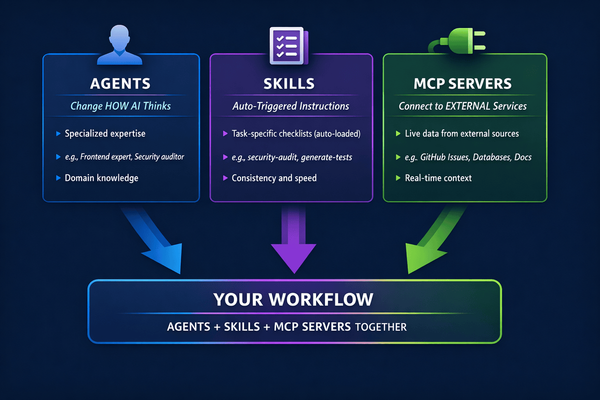
Skills are lazy-loaded modules of domain expertise. That's the whole mental model. You don't new up your entire object graph at startup. You register services and resolve what you need, when you need it. Agent Skills apply the same idea to instructions.
A skill is a folder (or a class, more on that later) containing a SKILL.md file with YAML frontmatter, optional reference resources, and optional scripts. The framework advertises skills to the model through progressive disclosure, in four stages:
- Advertise. Only the skill's name and one-line description enter the context. A whole catalog of skills costs a few dozen tokens.
- Load. When the conversation actually touches the domain, the agent calls the
load_skilltool and pulls in the full instruction body fromSKILL.md. - Read resources. If the instructions point to deeper material like rate tables or approval matrices, the agent calls
read_skill_resourceto fetch exactly the document it needs. - Execute. For deterministic work (calculations, validations), the agent calls
run_skill_scriptto run a bundled script instead of guessing.
Each stage costs tokens only if the conversation reaches it. A catalog of 50 skills costs almost nothing at rest. That's the inversion that matters. Expertise stops being a fixed tax on every request and becomes something you pay for on demand.
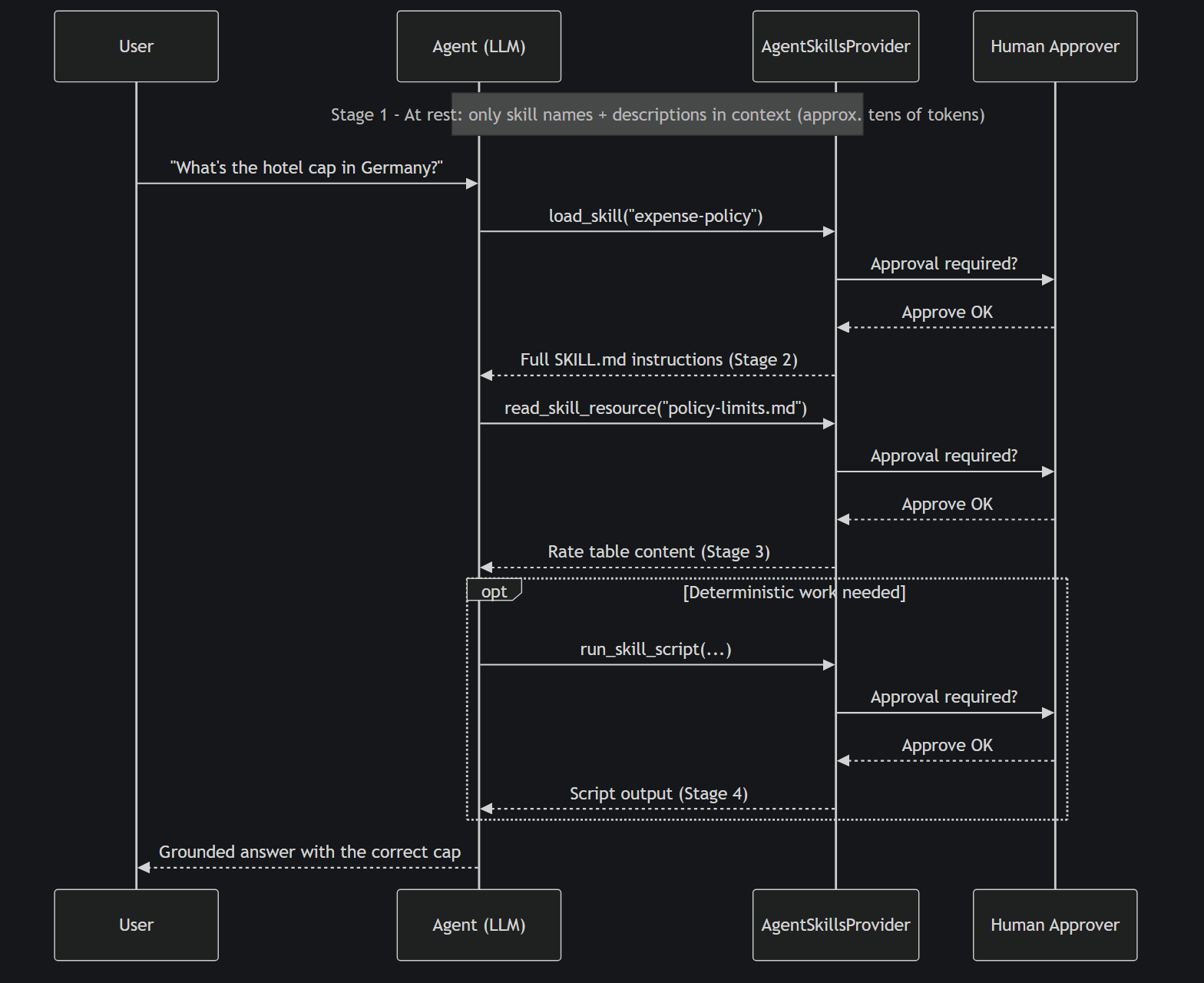
One default I'm glad Microsoft got right: all three tools require human-in-the-loop approval out of the box. Loading instructions into your agent's context is an act of trust. Running a bundled script even more so. You relax those gates deliberately, per tool, once you've decided a skill source is trusted. The framework doesn't assume it for you.
If this loading model sounds familiar, it should. It's the same lazy-vs-eager spectrum I mapped for coding assistants in when AI tools actually load your context files. Agent Skills bring that discipline to your own production agents.
What "Stable" Actually Means (and Why You Can Ship This)
The headline change is simple: the [Experimental] attribute is removed. No more #pragma warning disable scattered through your codebase. No more "will this API survive the next preview?" anxiety. You can take a dependency on this in production today.
But the stable release isn't just a rubber stamp. Three things push it past demo territory:
Skill filtering with predicates. You can filter which skills a given agent, or a given tenant, can see and load. In my view this is what makes skills viable for multi-tenant SaaS: one skill catalog, per-tenant visibility, enforced in code rather than in prompt engineering. Your enterprise customers' custom policies stay theirs.
Caching with per-key isolation. Skill content is cached so you're not re-reading disk (or blob storage) on every advertisement pass, and cache keys are isolated so one tenant's skill set never bleeds into another's.
An extensible source pipeline. The skill source classes are now public. Out of the box you point the provider at a directory, but nothing stops you loading skills from Azure Blob Storage, a database, or your CMS. Wherever your organisation already keeps its policy documents.
Now the sharp edge, because the marketing copy won't tell you: script execution sandboxing is your job. File-based skills delegate script execution to a runner you provide. The framework hands you the script; your runner decides how (and whether) to execute it. SubprocessScriptRunner runs it as a subprocess on your host. Fine for scripts you authored and reviewed. Reckless for scripts from sources you don't control. Class-based and code-defined skills run their logic in-process, which is exactly as safe as the rest of your own code. Know which model you're in before you flip the approval gates off.
Hands-On: Build an Expense-Policy Skill in 15 Minutes
Time to build the thing. Scenario: an internal HR/finance assistant that answers expense-policy questions. "Can I expense a client dinner?", "What's the hotel cap in Germany?" And the policy lives nowhere near the system prompt.
The skill structure
A file-based skill is just a folder:
skills/
  expense-policy/
    SKILL.md
    resources/
      policy-limits.md
      approval-matrix.md
SKILL.md carries YAML frontmatter, which is the only part advertised to the model at rest, plus the full instruction body that loads on demand:
---
name: expense-policy
description: Company expense policy — reimbursement rules, per-diem and hotel caps by country, approval workflows. Use for any question about what employees can expense and how.
---

# Expense Policy Skill

You are answering questions about the company expense policy.
Always ground answers in the policy documents — never guess limits.

## How to answer

1. For any question involving specific limits (hotel caps, per-diem
   rates, meal allowances), read `resources/policy-limits.md` before
   answering. Quote the exact figure and currency.
2. For questions about who must approve an expense, read
   `resources/approval-matrix.md`.
3. Client entertainment (dinners, events) is expensable with prior
   manager approval and an attendee list. Alcohol is capped at 30%
   of the total bill.
4. If the policy does not cover the scenario, say so explicitly and
   direct the employee to [email protected]. Do not improvise
   policy.

Always state the policy version and effective date from the
resource documents in your answer.
Look at what just happened on the org chart: HR can own this file. It's markdown. It lives in Git. Policy changes are pull requests with diffs and reviewers, not edits to a C# string constant. That alone would justify the migration for me.
The C# wiring
The provider plugs into the agent through AIContextProviders, the same extension point as any other context provider in the framework:
using Azure.AI.OpenAI;
using Azure.Identity;
using Microsoft.Agents.AI;
using OpenAI.Responses;

var skillsProvider = new AgentSkillsProvider(
    Path.Combine(AppContext.BaseDirectory, "skills"),
    SubprocessScriptRunner.RunAsync);

AIAgent agent = new AzureOpenAIClient(new Uri(endpoint), new DefaultAzureCredential())
    .GetResponsesClient()
    .AsAIAgent(new ChatClientAgentOptions
    {
        Name = "ExpensesAssistant",
        ChatOptions = new()
        {
            ModelId = deploymentName,
            Instructions = "You are a helpful internal HR and finance assistant.",
        },
        AIContextProviders = [skillsProvider],
    });

var response = await agent.RunAsync("What's the hotel cap for a business trip to Germany?");
Console.WriteLine(response);
Two things I hit building this that the announcement won't tell you. The announcement's snippet passes model: as a separate argument; against the current packages it goes in ChatOptions.ModelId, and you need using OpenAI.Responses; for AsAIAgent to resolve. Second, and more surprising: SubprocessScriptRunner is not in the NuGet package. It's a sample file in the agent-framework repo you copy into your project. That's deliberate. The framework refuses to own script execution, so you're forced to look at the runner you're shipping. I respect the design; I just wish the announcement said so.
That's the entire integration. Note the system prompt: "You are a helpful internal HR and finance assistant." Eleven words. The expense policy is nowhere in it.
Watching progressive disclosure fire
Run that query and trace the tool calls. This is the payoff moment:
- The model sees only the advertised catalog:
expense-policy -- Company expense policy... - It recognises the question is in-domain and calls
load_skill("expense-policy"). The approval prompt fires. You approve, and the full instructions enter context. - The instructions tell it to check the rate table, so it calls
read_skill_resourceforpolicy-limits.md. Approve again. - The final answer quotes the exact German hotel cap, currency, and policy version. Grounded in the document, not hallucinated.
The token math
Let's put real numbers on it. A realistic full expense policy (limits tables, approval matrix, country-specific rules) runs around 4,000 tokens. Inline it in the system prompt and you pay that on every request, relevant or not.
| Approach | Cost per request (at rest) | Cost when policy is actually needed |
|---|---|---|
| Policy inlined in system prompt | ~4,000 tokens, every call | ~4,000 tokens |
| Agent Skill (advertised only) | ~30 tokens (name + description) | ~30 + instructions + only the resources touched |
At 10,000 requests a month where maybe 8% are expense questions, the inlined version burns roughly 40 million prompt tokens on the policy alone. The skill version spends a fraction of that, concentrated on the requests that actually need it. Adjust for your own traffic; the shape of the win doesn't change. And 92% of your requests now run with a cleaner context, so the quality win rides along for free.
Three Ways to Author -- Pick the Right One
Everything above used a file-based skill, but the framework gives you three authoring modes. One AgentSkillsProvider runs all of them, and the agent can't tell the difference. Authoring mode is an implementation detail.
| File-based | Class-based | Code-defined | |
|---|---|---|---|
| Best for | Content-heavy domain knowledge | Skills that are really code with instructions attached | Dynamic skills composed at runtime |
| Ownership | Non-devs (HR, Legal) edit markdown; Git-versionable | Developers; ships via NuGet | Developers; built from app state |
| Testability | Content review via PR | Strongly typed, unit-testable | Testable like any runtime composition |
| Script execution | Delegated to your runner (you own sandboxing) | In-process, typed methods | In-process delegates, can close over app state |
My rules of thumb:
- File-based when the value is the content and the right people to maintain it don't write C#. The expense policy is the textbook case.
- Class-based when the skill is genuinely code (validation logic, calculations) and you want compile-time safety, unit tests, and NuGet distribution across teams.
- Code-defined when skills must be assembled at runtime: per-tenant instructions pulled from a database, or logic that closes over live application state.
There's already a growing public catalog of ready-made skills in the Awesome Copilot skills collection. Worth raiding for patterns before you write your own.
One boundary worth keeping crisp: skills are for knowledge and procedures; MCP is for tools and data. If the agent needs to query your database, that's a tool. See my walkthrough on exposing tools to agents via a C# MCP server. If the agent needs to know your rules, that's a skill. Most real agents want both.
Take the Policy Out of the Prompt
No hedging: if your system prompt carries 1,000+ tokens of domain instructions, you have an architecture problem, and it now has a stable, first-party fix. The God Object prompt gets decomposed into modular, versionable, lazily loaded SKILL.md files. Exactly how we decomposed God Objects in code twenty years ago.
That's the 75%-easier takeaway: expertise becomes as easy to manage as files in a folder. HR owns the policy file. Git owns the history. The provider owns the loading. Your token bill owns the savings.
Your homework for this week: take the single biggest block of policy text out of your system prompt, drop it into a SKILL.md, wire up AgentSkillsProvider, and measure the token delta across your next 100 requests. I'd be surprised if it takes you more than an afternoon.
Full references: the stable release announcement, the official Agent Skills docs for C#, and the background posts on the skills concept and the three authoring modes.
So, what's living in your system prompt that shouldn't be? Tell me in the comments. The worst confession wins.