.NET 10's Agent Framework: Build Your First Multi-Agent AI App Without the PhD

Microsoft merged Semantic Kernel and AutoGen into one Agent Framework, shipped it alongside .NET 10, and then buried the good news under docs that assume you already build agent systems for a living. I read those docs so you don't have to. Then I built the thing the docs should have opened with.
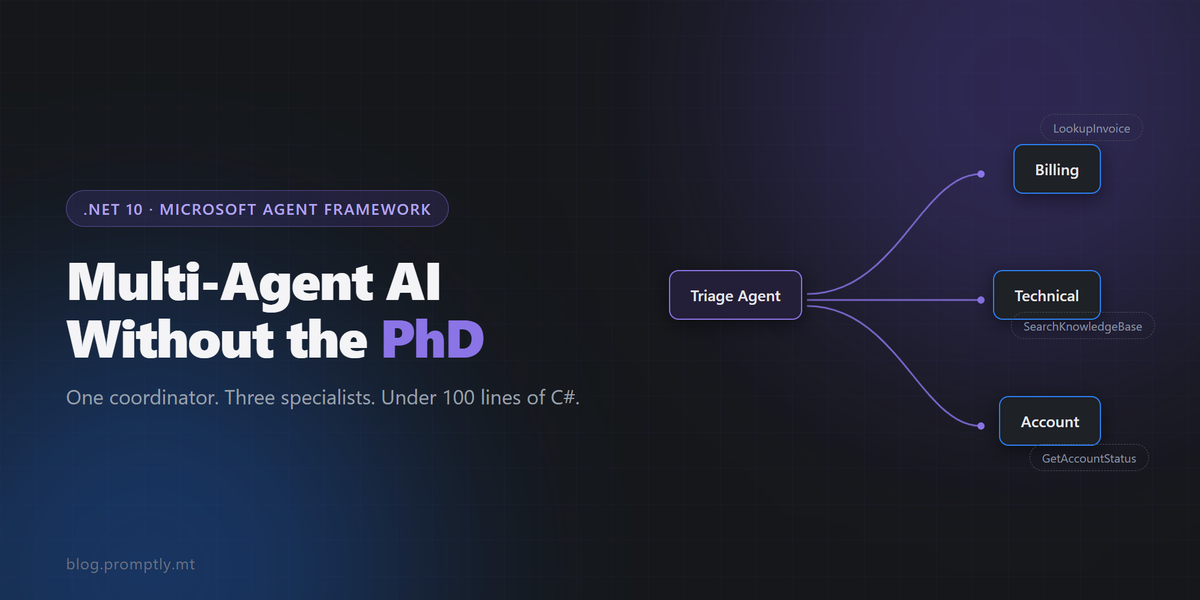
By the end of this post you'll have a working multi-agent support ticket triage system: one coordinator agent that reads incoming tickets, classifies them, and hands them off to specialist agents for billing, technical, and account issues. One console project. One NuGet package that matters. No orchestration theory before you see it run.
Plenty of noise right now about the agent features landing in .NET 11 Preview 7 and the MCP C# SDK 2.0. I'll touch on both at the end, but everything here runs on stable .NET 10, on purpose. This is code you can ship.
If you haven't touched the framework yet, my earlier post covers the Agent Framework basics and single-agent setup. Five lines of code, one agent. This is the sequel: how agents work together on a real business problem, in an afternoon.
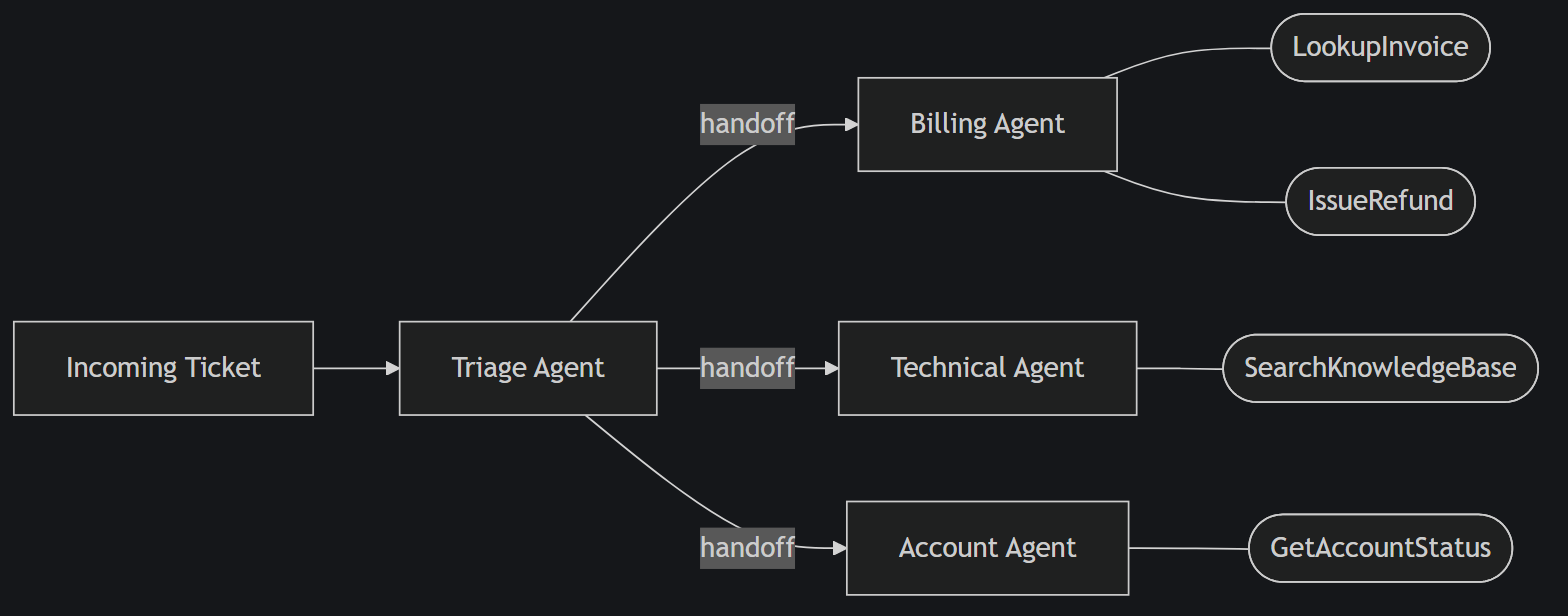
The 10-Minute Mental Model (Skip the Docs, Keep This)
The history in one sentence: Semantic Kernel gave Microsoft the plumbing (chat client abstractions, tool calling, DI integration), AutoGen gave them the multi-agent orchestration patterns, and the Agent Framework is those two glued together under Microsoft.Agents.AI.
You only need four concepts to build something real:
- Agent: an
IChatClientplus instructions plus tools. In the framework this is theAIAgenttype. - Tool: a plain C# method the agent can call. You decorate it with
[Description]and wrap it withAIFunctionFactory.Create(). - Workflow / orchestration: how agents pass work to each other. The pattern we care about today is the handoff.
- Thread / state: conversation memory, an
AgentThread. The workflow manages this for you in orchestrated scenarios.
If your brain is wired for .NET backend work, map it like this: agents are scoped services with a personality, tools are handler methods, orchestration is a message pipeline. If you can wire up MediatR handlers, you can wire up agents. The coordinator is your mediator, the handoff targets are your handlers, and the LLM replaces your switch on message type. That's genuinely the whole mental shift.
The docs also throw declarative YAML-style workflows, checkpointing, and human-in-the-loop approval gates at you on page one. Ignore all of it on day one. Useful later, required never (well, not for your first feature).
Build the Triage App: One Coordinator, Three Specialists
Ticket triage is the perfect first multi-agent app. Every company has some version of it, and the routing logic is fuzzy enough that regex classification always disappoints. I've written those regexes. They work until the first customer writes "my card got charged twice" without ever using the word "invoice". The structure here (one classifier, N specialists) also maps onto dozens of other domains. Swap the specialists and you've got a lead qualifier, a document router, an incident dispatcher.
Setup
One console project, two packages:
dotnet new console -n TicketTriage
cd TicketTriage
dotnet add package Microsoft.Agents.AI.OpenAI --prerelease
dotnet add package Microsoft.Agents.AI.Workflows --prerelease
Microsoft.Agents.AI.OpenAI pulls in the core Microsoft.Agents.AI package and the Microsoft.Extensions.AI abstractions. The Workflows package is where the orchestration builders live.
Check the package feed for current versions. The core packages went GA, while Workflows was still stabilising behind a prerelease flag at the time of writing. API shapes below match the official samples in the microsoft/agent-framework repo.Then a chat client. I'm showing Azure OpenAI because that's what most .NET shops already have sitting in a subscription:
using Azure.AI.OpenAI;
using Azure.Identity;
using Microsoft.Agents.AI;
using Microsoft.Extensions.AI;

IChatClient chatClient = new AzureOpenAIClient(
        new Uri(Environment.GetEnvironmentVariable("AZURE_OPENAI_ENDPOINT")!),
        new AzureCliCredential())
    .GetChatClient("gpt-4o-mini")
    .AsIChatClient();
Because everything sits on IChatClient, swapping the model provider is one line. Point it at Ollama or LM Studio and the whole thing runs locally for zero API cost. I covered that workflow in my post on running multi-agent setups fully local with LM Studio.
Beat 1: Three specialists, ~10 lines each
A specialist is instructions plus tools. Here's the billing agent, complete:
using System.ComponentModel;

[Description("Looks up an invoice by its number and returns its status and amount.")]
static string LookupInvoice(
    [Description("The invoice number, e.g. INV-1042")] string invoiceNumber)
    => invoiceNumber switch
    {
        "INV-1042" => "INV-1042: EUR 49.00, status FAILED (card declined on 2026-08-14)",
        "INV-0991" => "INV-0991: EUR 199.00, status PAID",
        _          => $"{invoiceNumber}: not found"
    };

AIAgent billing = chatClient.CreateAIAgent(
    name: "BillingAgent",
    instructions: """
        You resolve billing issues: failed payments, refunds, invoice questions.
        Always look up the invoice before answering. Be concise and concrete.
        """,
    tools: [AIFunctionFactory.Create(LookupInvoice)]);
That's it. CreateAIAgent is an extension method on IChatClient from Microsoft.Agents.AI. Same five-line pattern from the single-agent post, now stamped out three times. The technical agent gets a SearchKnowledgeBase tool, the account agent gets GetAccountStatus:
AIAgent technical = chatClient.CreateAIAgent(
    name: "TechnicalAgent",
    instructions: "You diagnose product errors and outages. Search the KB first.",
    tools: [AIFunctionFactory.Create(SearchKnowledgeBase)]);

AIAgent account = chatClient.CreateAIAgent(
    name: "AccountAgent",
    instructions: "You handle logins, password resets, and account access issues.",
    tools: [AIFunctionFactory.Create(GetAccountStatus)]);
In the sample repo those tools return canned data. In your version, they call your actual services. They're just C# methods, so inject whatever you want behind them.
Beat 2: The coordinator and the handoff
The triage agent owns no tools. Its only job is to read the ticket and decide who gets it:
AIAgent triage = chatClient.CreateAIAgent(
    name: "TriageAgent",
    instructions: """
        You are a support ticket triage coordinator. Read the ticket and hand
        off to exactly one specialist: BillingAgent for payments and invoices,
        TechnicalAgent for errors and outages, AccountAgent for access issues.
        Do not attempt to solve the ticket yourself.
        """);
Now the orchestration. This is the part the docs make feel like a research paper. It's about 8 lines:
using Microsoft.Agents.AI.Workflows;

var workflow = AgentWorkflowBuilder
    .CreateHandoffBuilderWith(triage)          // triage is the entry point
    .WithHandoffs(triage, [billing, technical, account])
    .WithHandoff(billing, triage)              // specialists can bounce back
    .WithHandoff(technical, triage)
    .WithHandoff(account, triage)
    .Build();
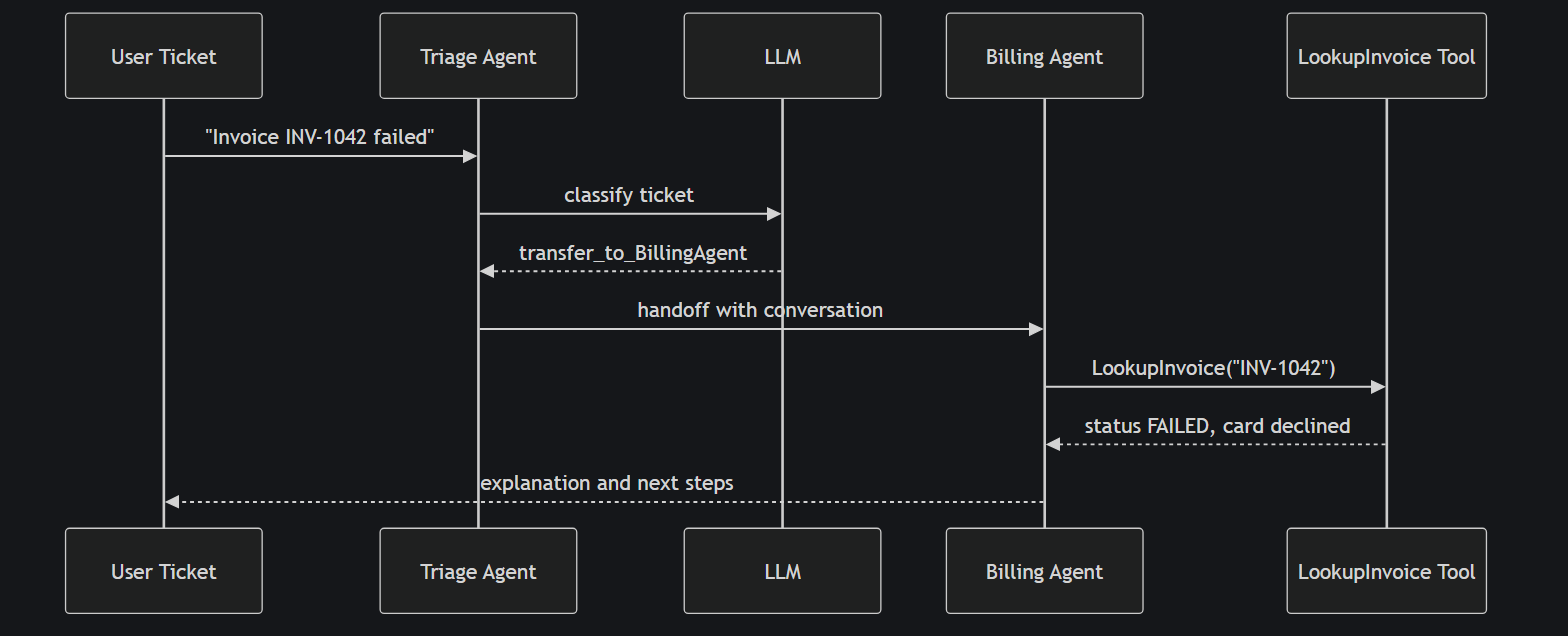
Read it like a routing table. WithHandoffs(triage, [...]) means the triage agent may transfer control to any of the three specialists. The reverse edges let a specialist punt a misrouted ticket back. Under the hood, each handoff is exposed to the model as a tool call (the LLM literally calls transfer_to_BillingAgent), but you never see that machinery.
Beat 3: Run it
string[] tickets =
[
    "My payment for invoice INV-1042 failed and I got charged twice!",
    "The dashboard throws a 502 every time I open the reports page.",
    "I can't log in since yesterday, password reset email never arrives."
];

foreach (var ticket in tickets)
{
    Console.WriteLine($"\n=== TICKET: {ticket} ===");

    StreamingRun run = await InProcessExecution.StreamAsync(
        workflow, new ChatMessage(ChatRole.User, ticket));

    await foreach (WorkflowEvent evt in run.WatchStreamAsync())
    {
        if (evt is AgentRunUpdateEvent update)
            Console.Write(update.Update.Text);
    }
}
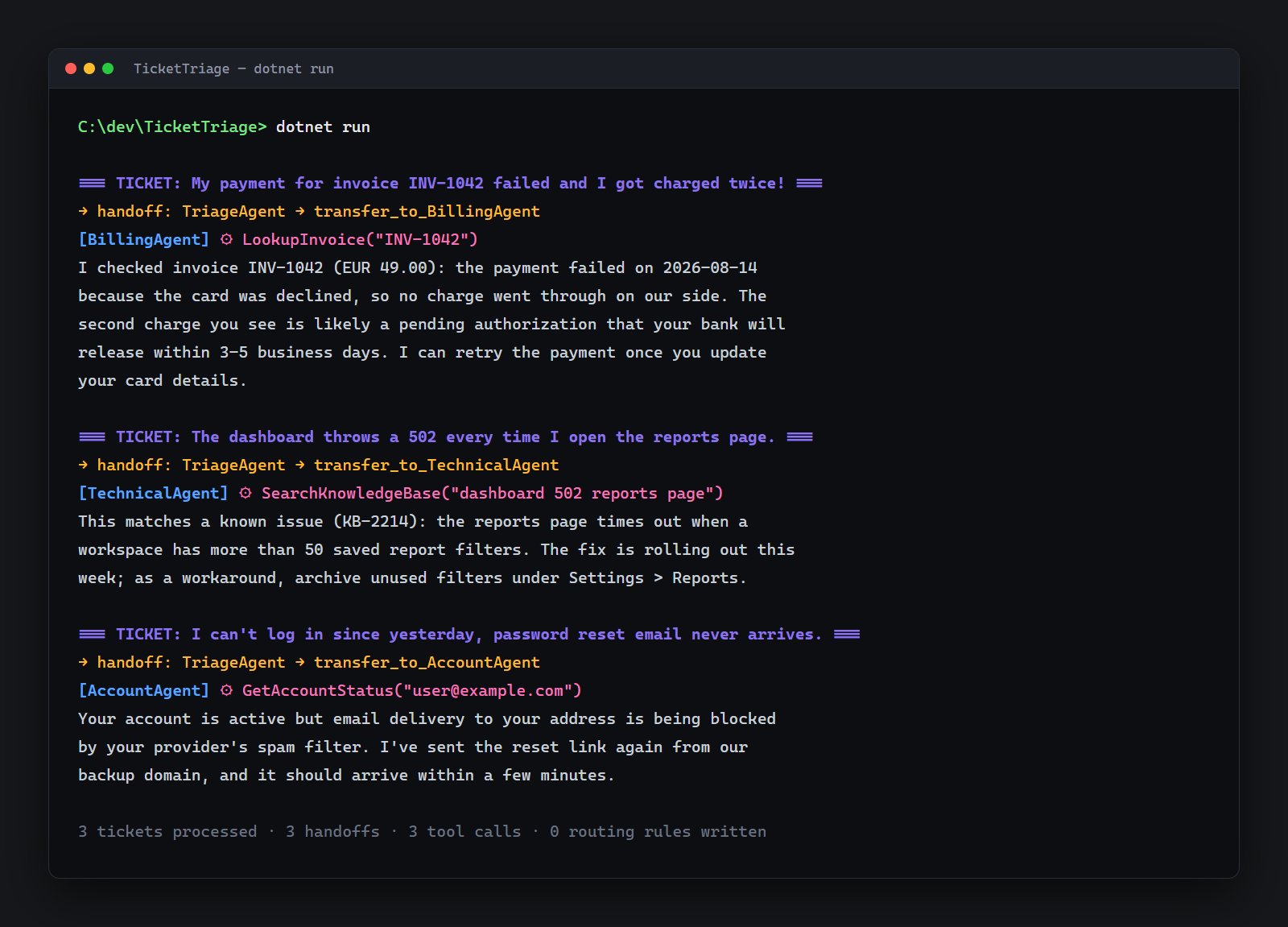
InProcessExecution runs the whole workflow in your process and streams workflow events (agent output, handoff decisions, completion) as they happen. Run it and you watch the triage agent route each ticket, the right specialist pick it up, call its tool, and answer.
Here's the full request lifecycle for one ticket:
Now look at what we didn't write. No state machine. No queue. No routing regex. The classification, the routing, and the conversation state all live in the workflow. The entire app is under 100 lines.
The Parts the Docs Make Confusing (And What Actually Matters)
Orchestration patterns, one paragraph each. Sequential chains agents in a fixed order, so agent A's output feeds agent B. Good for pipelines like draft-then-review. Concurrent fans the same input out to several agents in parallel and collects the results. Good for multi-perspective analysis. Handoff is what we built: agents dynamically transfer control based on context. Group chat puts agents in a shared conversation with a manager deciding who speaks next.
My blunt guidance: start with handoff. It covers nearly every routing and triage scenario in line-of-business software. Sequential is your second tool, for pipelines. You almost certainly don't need group chat for business apps. It's the pattern that demos beautifully and debugs miserably.
Structured output is the most undersold feature in the framework. Free-text agent answers are fine for chat and useless for systems. You want the triage decision as a typed record you can log, store, and act on:
public record TriageDecision(
    string Category,   // billing | technical | account
    string Priority,   // low | medium | high
    string Summary,
    string RoutedTo);

AIAgent classifier = chatClient.CreateAIAgent(new ChatClientAgentOptions
{
    Name = "Classifier",
    Instructions = "Classify the support ticket.",
    ChatOptions = new ChatOptions
    {
        ResponseFormat = ChatResponseFormat.ForJsonSchema(
            AIJsonUtilities.CreateJsonSchema(typeof(TriageDecision)))
    }
});

AgentRunResponse response = await classifier.RunAsync(ticket);
TriageDecision decision = response.Deserialize<TriageDecision>(JsonSerializerOptions.Web);
The model is constrained to that JSON schema, and you get a real C# record back. This is the difference between a demo and a feature you can put behind an API endpoint.
Observability comes free. Agents are Microsoft.Extensions.AI citizens, so they emit OpenTelemetry traces out of the box. Every agent invocation, tool call, and handoff shows up as a span. Point the app at an Aspire dashboard and you watch a ticket's journey through the agents like any other distributed trace. This matters more than it sounds: when someone asks "why did the AI route this ticket to billing?", you have an answer instead of a shrug.
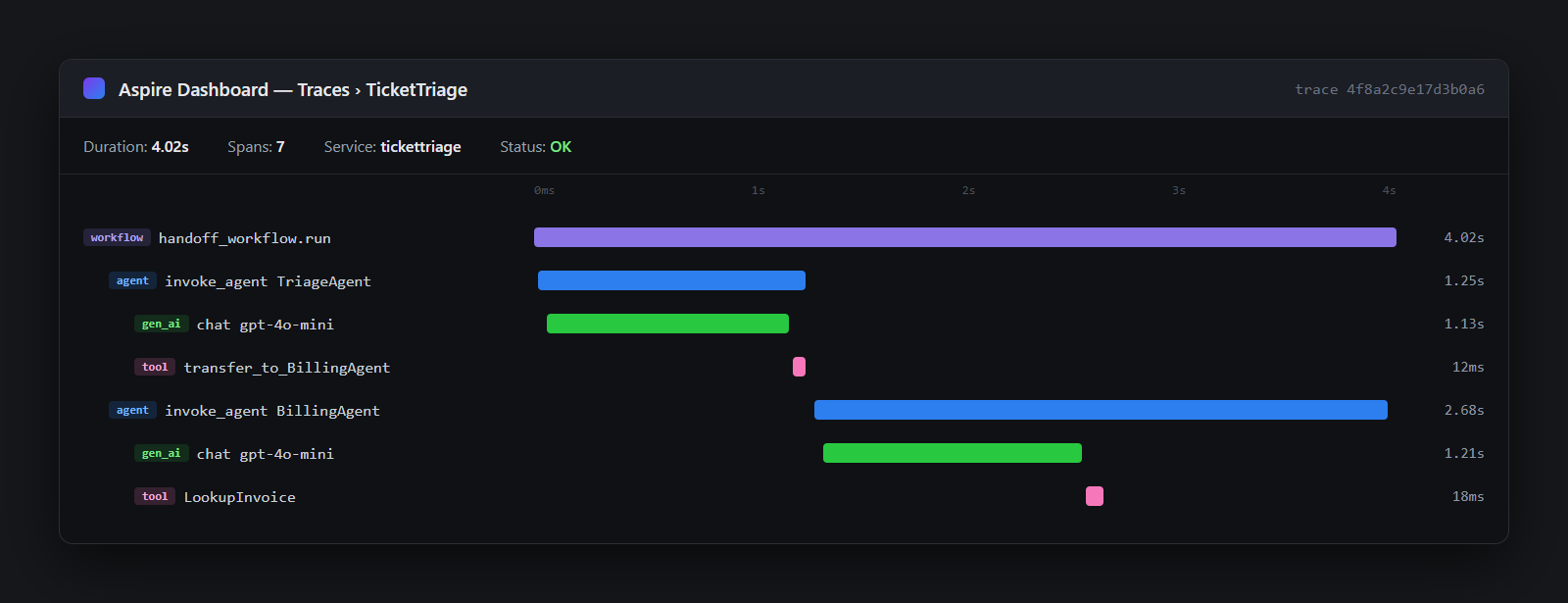
Now the honest part: cost and latency. Every handoff is another LLM round-trip. Our triage flow makes at minimum two model calls per ticket (classify plus specialist answer), plus one per tool call. Three agents can easily be 3x slower and 3x more expensive without being 3x smarter. If your specialists share most of their instructions and just carry different tools, collapse them back into one agent with more tools. The framework makes that a five-minute refactor, and one agent with many tools is often the right answer. Reach for multiple agents when the specialists need genuinely different instructions, different models, or different permission boundaries. Same discipline as microservices: don't distribute what doesn't need distributing.
Where This Is Heading (.NET 11 Preview 7 and MCP 2.0)
The agent additions showing up in .NET 11 Preview 7 tell you where Microsoft is going. Agents aren't a side library anymore. They're becoming platform-level primitives, the way IHttpClientFactory and hosted services did before them. That's what makes this safe to build on. This isn't another experimental SDK that gets archived in eighteen months.
The other piece is the MCP C# SDK 2.0. Today our specialists use hand-written tool methods. The natural next step is specialists that consume MCP servers: your billing agent talks to a billing MCP server, your technical agent to a knowledge-base server, and tools become deployable, shareable infrastructure instead of methods in a console app. If you want the server side of that story, I walked through building an MCP server in C# to expose your database to agents in an earlier post.
My advice: build on .NET 10 stable today. The preview-channel features are additive. The AIAgent and workflow code in this post is the code that carries forward.
Ship One This Week
A year ago, "coordinator agent with dynamic handoff to tool-wielding specialists" meant a message bus, a routing service, and a two-week design review. Today it's one NuGet package, under 100 lines, and an afternoon. That's the 75% easier threshold where a thing stops being a project and becomes a feature.
So here's the move: clone the sample, rip out my three specialists, and drop in your own. Your invoicing service, your KB search, your CRM. Ship an internal triage tool this week. It doesn't need to be perfect. It needs to exist, with OpenTelemetry traces so you can watch it make decisions.
Next up: wiring these specialists to real MCP servers so the tools live outside the app. Subscribe if you want that one when it lands.