Your Best AI Prompt Should Be a Tested Workflow, Not a Saved Chat

A saved chat isn't a team workflow
"Use the prompt from that conversation. Not the first version. The one after I told it not to upgrade everything."
That's a terrible dependency for a development team.
I don't want a useful maintenance process living halfway down somebody's chat history. I want it next to the code, with clear inputs, a sensible stopping point, and checks another developer can run.
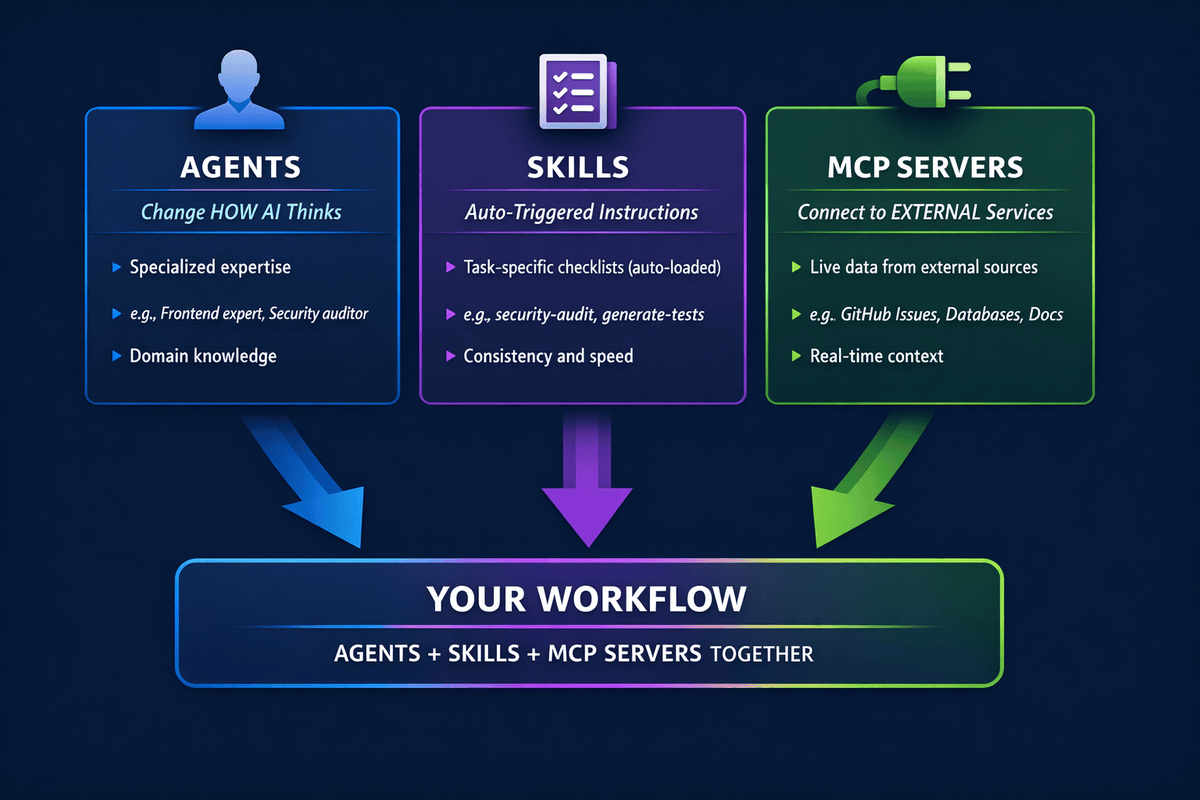
That's where agent skills become useful to me. Not as a collection of clever prompts. As small, reviewable workflows for jobs we keep doing.
I'd start with two:
- Upgrade one .NET dependency without quietly changing application behaviour.
- Turn a reproducible bug into a regression test, then fix it.
These are constructed examples, not claims about a particular team's adoption. I checked the small code examples locally; I haven't benchmarked an autonomous agent completing these skills.
That distinction matters. A working script and a reliable agent workflow are two different things.
Why package this as a skill?
The author of this Hacker News discussion about sharing agent skills describes a practical frustration: useful workflows are often tiny, but handing them to somebody else still takes effort. They stay on one machine.
I wouldn't treat one discussion as adoption data. But I recognise the design problem: knowledge that only works in one person's environment isn't much help to the next developer.
The Agent Skills specification gives us a simple package: a directory containing SKILL.md, with optional scripts and reference material. The file has YAML metadata describing the skill and when to use it, followed by instructions.
GitHub's current Copilot documentation supports repository skills in .github\skills, among other locations. I'll use that here. Other clients have their own discovery and invocation rules; a shared format doesn't guarantee identical execution.
For these examples, the layout is:
.github\
  skills\
    upgrade-dotnet-dependency\
      SKILL.md
    fix-with-regression\
      SKILL.md
      scripts\
        test_one.py
I would keep broad repository conventions in the normal instruction files. The dependency upgrade procedure only needs to load when we're upgrading a dependency. I've covered the distinction in when AI coding tools load context files.
And if we're building an agent inside a .NET application rather than configuring a coding assistant, that's a different integration, covered in my Agent Skills for .NET walkthrough.
A skill describes the process. It doesn't enforce the process. Required CI checks, tool permissions and review still do jobs that Markdown cannot.
Skill 1: Upgrade one dependency, preserve the behaviour
"Upgrade FluentValidation" sounds straightforward.
But which version? Which projects? Are versions centralised? Does this change what our API sends back when somebody submits an invalid form?
For a concrete example, I'll use FluentValidation 11.11.0 to 12.0.0. These are fixed teaching versions, not a recommendation to install an old release or a claim about the latest available package.
The official FluentValidation 12 upgrade guide gives us two useful checks:
- .NET 8 is the minimum supported version. A .NET 6 application needs a separate framework-upgrade decision.
AbstractValidator.CascadeModeandCascadeMode.StopOnFirstFailurewere removed. Their replacement needs to preserve both rule-level and class-level behaviour.
That's already more useful than asking an agent to "make the build green."
Give the task a boundary
I'd save this as .github\skills\upgrade-dotnet-dependency\SKILL.md:
---
name: upgrade-dotnet-dependency
description: Upgrade one named NuGet dependency to an exact approved version, review breaking changes, and verify affected behaviour. Use for bounded .NET package upgrades, not whole-repository modernization.
compatibility: Requires the repository's .NET SDK, test runner and configured NuGet access.
---

## Inputs
Package ID, exact target version, affected projects, behaviour to preserve,
and the existing commands for focused tests and required repository checks.
If an input is missing or ambiguous, clarify it before editing.

## Procedure
1. Record existing changes; preserve them. Inspect SDK/TFMs, package version
   ownership, central package management, lock files and all affected consumers.
2. Read the publisher's migration notes across the current-to-target range.
   Map each relevant change to a call site or test. Cite URLs and versions.
3. Run focused baseline tests. Require actual executed tests, not just exit 0.
   Stop on baseline failures or missing infrastructure; report the blocker.
4. Change only the approved dependency and necessary compatibility code.
   Report transitive changes. Stop if an SDK, framework or unrelated package
   upgrade is needed outside the approved scope.
5. Repeat focused tests and required repository checks. Compare behaviour
   with the baseline, including externally visible error contracts.

## Done
Report resolved version, changed files, migration decisions, commands,
executed/passed/failed/skipped counts, evidence paths and remaining gaps.
Never weaken tests, disable analyzers, hide warnings or broaden scope to pass.
Do not commit, publish packages, deploy or access production.
If evidence is incomplete, report blocked rather than done.
The invocation can be ordinary language:
Use upgrade-dotnet-dependency to move FluentValidation from 11.11.0 to 12.0.0 in WorkflowExamples.Tests. Preserve one validation error per failing rule. Run ValidationTests before and after, then the full test project. Don't change frameworks or other direct dependencies.
In a real solution, I'd name the API project, its consumers and its integration tests instead. A central version change can affect several projects even when the request names only one.
Test something a user would notice
Here's a small xUnit fixture. From a fresh scratch directory, using the .NET 10 SDK:
dotnet new xunit --name WorkflowExamples.Tests --framework net10.0
dotnet package add FluentValidation --version 11.11.0 --project .\WorkflowExamples.Tests\WorkflowExamples.Tests.csproj
Run each command separately and stop on errors. The noun-first package command requires .NET 10 or later; older SDKs use dotnet add package.
Add this to a new .cs file in the test project:
using FluentValidation;
using Xunit;

namespace WorkflowExamples.Tests;

public record Registration(string Name, int Age);

public sealed class RegistrationValidator : AbstractValidator<Registration>
{
    public RegistrationValidator()
    {
        CascadeMode = CascadeMode.StopOnFirstFailure;
        RuleFor(x => x.Name).NotEmpty().MinimumLength(3);
        RuleFor(x => x.Age).GreaterThan(0);
    }
}

public class ValidationTests
{
    [Fact]
    public void Invalid_registration_reports_one_error_per_rule()
    {
        var result = new RegistrationValidator()
            .Validate(new Registration("", 0));

        Assert.Equal(2, result.Errors.Count);
        Assert.Equal(
            new[] { "Name", "Age" },
            result.Errors.Select(x => x.PropertyName));
    }
}
The old API produces deprecation warnings on version 11. That's intentional in this migration fixture, not something I'd suppress.
Run the baseline:
dotnet test .\WorkflowExamples.Tests\WorkflowExamples.Tests.csproj --filter "FullyQualifiedName~WorkflowExamples.Tests.ValidationTests"
We expect one executed, passing test. Then make the bounded package change:
dotnet package add FluentValidation --version 12.0.0 --project .\WorkflowExamples.Tests\WorkflowExamples.Tests.csproj
The old constructor no longer compiles. Following the migration guide, replace its cascade assignment with:
ClassLevelCascadeMode = CascadeMode.Continue;
RuleLevelCascadeMode = CascadeMode.Stop;
Then rerun the same test and the full project:
dotnet test .\WorkflowExamples.Tests\WorkflowExamples.Tests.csproj --filter "FullyQualifiedName~WorkflowExamples.Tests.ValidationTests"
dotnet test .\WorkflowExamples.Tests\WorkflowExamples.Tests.csproj
Why both settings? I want validation to stop within a failing rule chain, but continue to the next rule. Setting the class-level mode to Stop would stop after the name error, hiding the age error.
The code could compile while the form gets worse: correct one field, submit again, discover the next problem.
That's the behaviour the test protects. It doesn't prove the API's status code, error JSON or localisation stayed unchanged. Those need their own contract tests in the actual application.
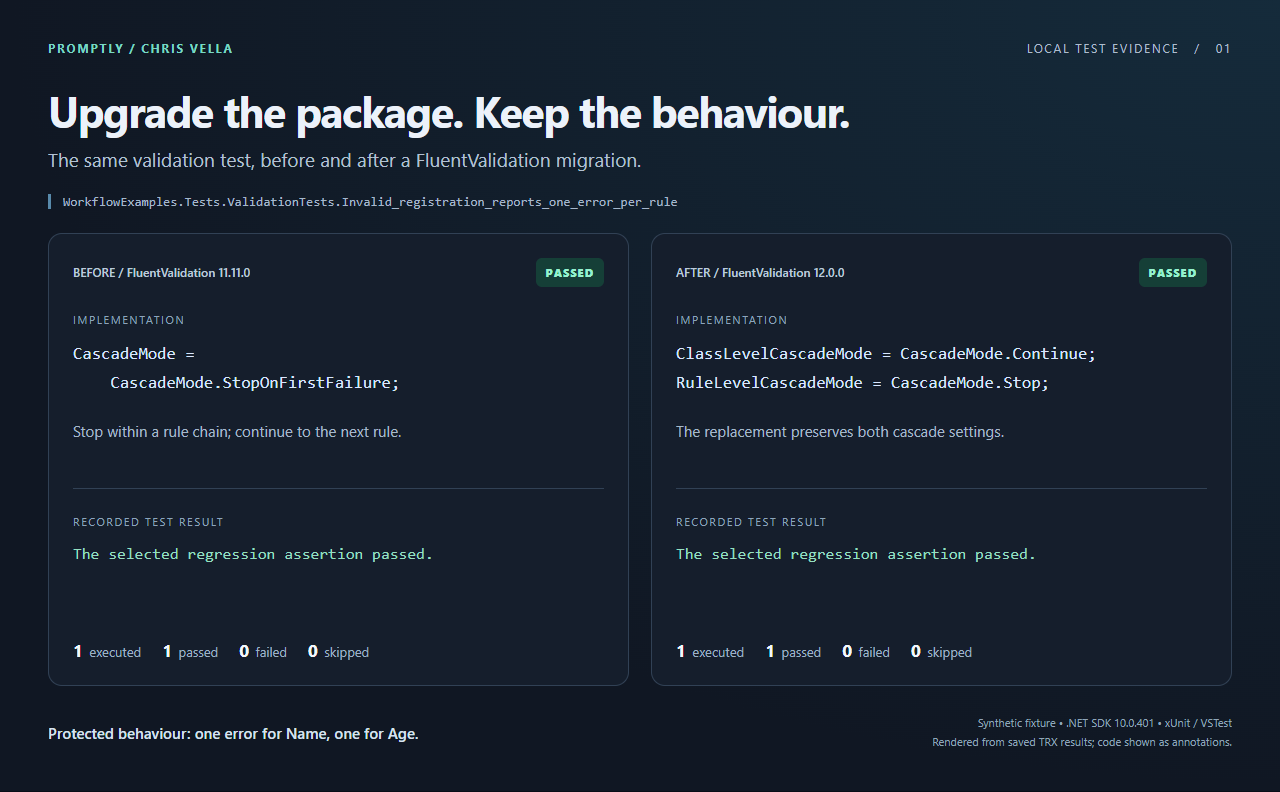
A screenshot of the report rendered from the actual local TRX files, with the migration code added as annotations. Both runs preserve the Name and Age validation errors in this synthetic fixture.
And if we're already using Dependabot or Renovate, I wouldn't replace them with this. Let the existing bot propose updates. Use the skill for the migration analysis and evidence that a version bump alone doesn't provide.
Skill 2: No fix without a failing regression test
My second skill would address a different shortcut: changing the implementation, adding a test afterwards, and declaring the bug fixed.
Maybe it is. But did the test ever detect the original bug?
I'd make that evidence part of the workflow.
Save this as .github\skills\fix-with-regression\SKILL.md:
---
name: fix-with-regression
description: Fix a reproducible .NET bug by demonstrating an assertion failure before the implementation change and a pass afterwards. Use when expected behaviour is known; clarify ambiguous requirements first.
compatibility: The supplied helper requires Python 3, dotnet, VSTest and one single-target xUnit Fact.
---

## Inputs
Reproduction, expected behaviour, test project, affected code and required checks.

## Procedure
1. Preserve existing changes. Run relevant baseline tests and inspect the
   reproduction. Stop if unrelated failures prevent meaningful verification.
2. Add a deterministic regression test against the unchanged implementation.
   Control time, randomness and external dependencies where relevant.
3. Run scripts\test_one.py, relative to this skill directory, with the project,
   fully qualified test name and Failed. Invoke it from the repository root.
   Inspect the TRX failure: it must demonstrate the reported behaviour,
   not broken setup, restore, compilation or a different exception.
4. Save that evidence. If the test already passes, stop and investigate.
5. Make the smallest implementation fix. Keep the regression assertion.
6. Run the same helper with Passed, then relevant neighbouring tests and
   required repository checks. Check counts and investigate skips.

## Done
Report cause, changed files, red/green evidence, actual test counts and gaps.
Never skip or weaken a test to pass. Don't commit, deploy or use production.
If red evidence is missing, do not claim the workflow is complete.
Make the bug boring and deterministic
Suppose an invitation must be rejected at its expiry instant, but our code accepts it:
namespace WorkflowExamples.Tests;

public static class InvitationPolicy
{
    public static bool CanAccept(DateTimeOffset expiresAt, DateTimeOffset now)
        => now <= expiresAt;
}
Add that in its own file, and this test in another:
using Xunit;

namespace WorkflowExamples.Tests;

public class InvitationPolicyTests
{
    [Fact]
    public void Rejects_at_exact_expiry()
    {
        var expiry = new DateTimeOffset(
            2030, 1, 1, 12, 0, 0, TimeSpan.Zero);

        Assert.False(InvitationPolicy.CanAccept(expiry, expiry));
    }
}
No Thread.Sleep. No dependence on when the build machine happens to run it. The expected boundary is explicit.
The fix will be < instead of <=. But first we need a genuine red run.
Don't trust exit codes on their own
A misspelled filter can run no tests. A compilation error can return a failure without running the regression.
Here's the complete scripts\test_one.py helper. It uses Python's standard library to check a fresh VSTest TRX report:
import argparse
import subprocess
import tempfile
import xml.etree.ElementTree as ET
from pathlib import Path

parser = argparse.ArgumentParser()
parser.add_argument("project")
parser.add_argument("test_name")
parser.add_argument("expected", choices=["Passed", "Failed"])
args = parser.parse_args()

results = Path(tempfile.mkdtemp(prefix="skill-test-"))
print(f"Evidence: {results}", flush=True)
run = subprocess.run([
    "dotnet", "test", args.project,
    "--filter", f"FullyQualifiedName={args.test_name}",
    "--logger", "trx;LogFileName=result.trx",
    "--results-directory", str(results),
], check=False)

report = results / "result.trx"
if not report.is_file():
    raise SystemExit("No TRX: this is not test evidence.")
root = ET.parse(report).getroot()
ns = {"t": "http://microsoft.com/schemas/VisualStudio/TeamTest/2010"}
counters = root.find("t:ResultSummary/t:Counters", ns)
tests = root.findall("t:Results/t:UnitTestResult", ns)
if (counters is None or counters.get("total") != "1"
        or counters.get("executed") != "1" or len(tests) != 1):
    raise SystemExit(f"Expected exactly one executed test; inspect {report}")
expected_exit = 0 if args.expected == "Passed" else 1
if run.returncode != expected_exit or tests[0].get("outcome") != args.expected:
    raise SystemExit(f"Expected {args.expected}; inspect {report}")
print(f"Observed {args.expected}. Inspect the assertion evidence.")
This is deliberately narrow: one non-parameterised test in a single-target VSTest project. It is not a universal .NET test wrapper. Microsoft documents different CLI behaviour for VSTest and Microsoft.Testing.Platform; adapt the helper to the runner already used by the repository rather than switching runners to fit it.
The temporary directory keeps an old green report from satisfying a new run. The script leaves evidence there for inspection; archive the relevant report with the work, then remove the temporary directory.
From the repository root:
$project = ".\WorkflowExamples.Tests\WorkflowExamples.Tests.csproj"
$test = "WorkflowExamples.Tests.InvitationPolicyTests.Rejects_at_exact_expiry"
$check = ".\.github\skills\fix-with-regression\scripts\test_one.py"
python $check $project $test Failed
The helper succeeds only when it observes the expected failed test run. That means the red phase succeeded, not that the application is correct.
Inspect the failure. In this fixture it is Assert.False() Failure: expected False, actual True. A test fixture throwing during setup could also produce a failed result, so the helper cannot make that judgement for us.
Now change now <= expiresAt to now < expiresAt, then run:
python $check $project $test Passed
dotnet test $project
In the real task, I'd also cover just-before and just-after expiry, and the endpoint that turns an expired invitation into a useful response. A correct boundary check is not the whole user experience.
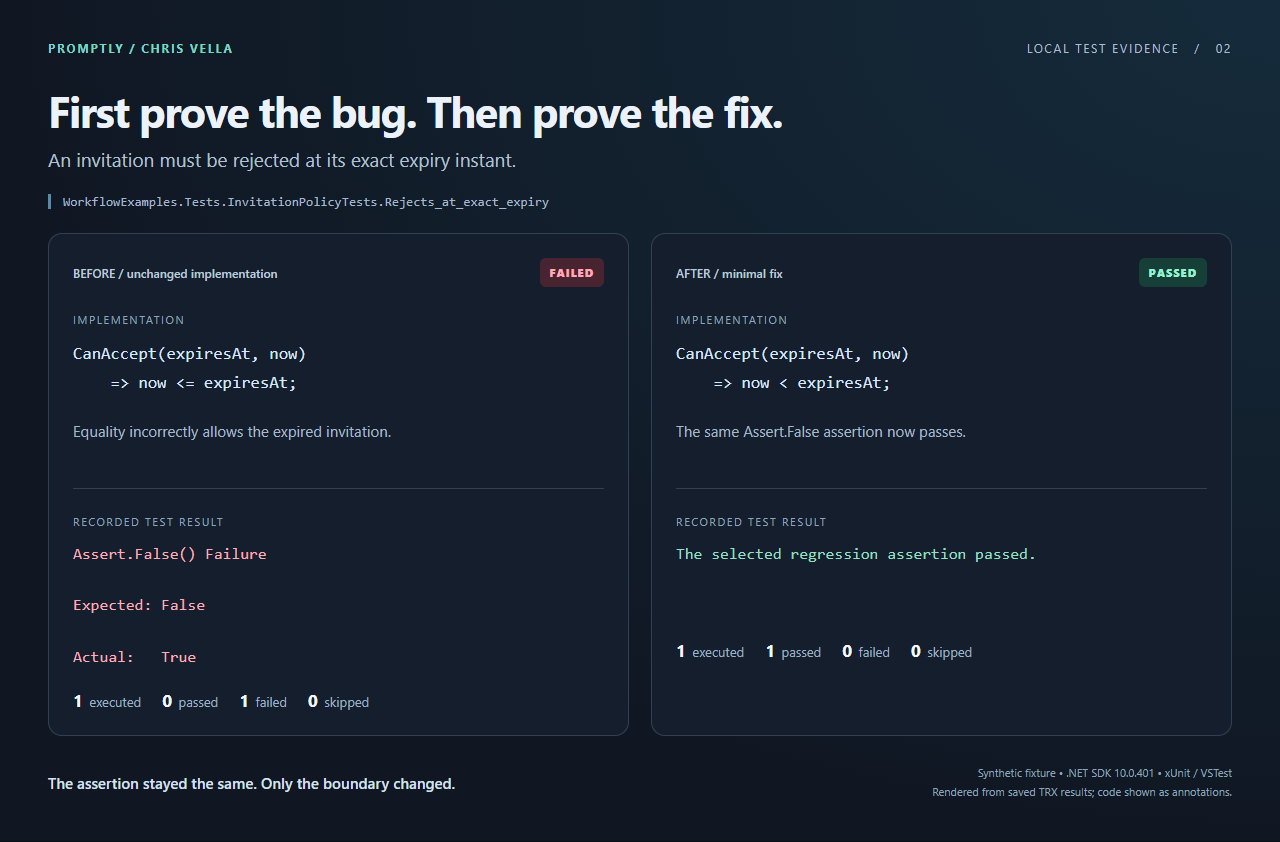
The recorded assertion failure and passing result, rendered from the saved TRX files. The code annotations show the boundary change; this is a synthetic local example, not a production incident.
What I actually checked
For this article, I exercised the fixtures with .NET SDK 10.0.401, xUnit 2.9.3 and VSTest via Microsoft.NET.Test.Sdk 17.14.1:
| Check | Observed result |
|---|---|
| FluentValidation 11.11.0, original cascade API | Behaviour test passed |
| Upgrade to 12.0.0 without migrating the API | Compilation failed on the removed API |
| Apply the documented cascade replacement | Same behaviour test passed |
| Invitation boundary before the fix | Assertion failed: expected false, actual true |
| Same assertion after the fix | Passed |
| Helper given a filter matching no tests | Rejected the run |
| Helper given a compilation failure | Rejected missing test evidence |
| Helper asked for failure when the test passed | Rejected the wrong outcome |
These results establish the small examples and the checked helper paths. They don't establish that either skill reliably guides every model, or that these checks cover a production system.
Version the workflow, then test the agent using it
I'd start by committing the two skill folders alongside the application through normal review. No marketplace required.
The repository revision versions the instructions, helper and application together. Give the skills an owner. Review script changes as code, not as harmless prompt edits. If several repositories later need the same skill, distribute a reviewed, pinned revision and keep repository-specific paths out of the shared instructions.
I would also keep the helper's acceptance rules outside the agent's editable scope during evaluation. Otherwise an agent can "solve" a difficult task by changing what passes.
The official Anthropic skill-creator implementation describes testing realistic prompts and comparing runs with and without a skill, or against its previous version. That's a useful model for evaluation, not proof that our new skills work.
Here's the small fixture set I'd build next:
| Scenario | What the evaluation should require |
|---|---|
| Supported FluentValidation upgrade | Approved version; original behaviour assertions still pass |
| Upgrade request for a .NET 6 consumer | Explicit blocker; no unapproved framework upgrade |
| Centrally managed package | Correct version owner and affected consumers identified |
| Invitation boundary bug | Red assertion before fix; unchanged assertion green afterwards |
| Regression filter typo or failing build | No claim of valid red/green evidence |
| Bug already fixed, or unclear expected behaviour | Investigate or clarify; don't manufacture a change |
| Unrelated documentation request | Neither maintenance skill unnecessarily activates |
For each run, I'd start from the same fixture snapshot and record the skill revision, model identifier, agent-client version, SDK, runner and permissions. Then compare repeated runs with the skill against the same task without it. Keep a few cases out of the tuning loop so we're not just memorising the examples.
After a model or client update, rerun those cases. Also rerun them when the skill, helper or SDK changes.
I'd measure correct outcomes, scope violations, missed blockers and human corrections, alongside elapsed time and review effort. Test transcripts and diffs matter more than a self-reported "done."
Passing the application tests answers one question. Evaluating the agent's choices answers another. We need both.
The 75% easier part
I wouldn't promise these two files save 75% of development time. I haven't measured that.
My target is narrower: remove most of the repeated explanation and evidence-gathering around a recurring task.
Instead of retyping the process, a teammate supplies the package and target version. Instead of reconstructing a bug-fix conversation, a reviewer gets the failing assertion, the passing assertion and a focused diff.
That connects directly to reducing the AI code review bottleneck: automation helps when it makes a change easier to accept, not merely easier to generate.
I still want a developer deciding whether the requirement makes sense. I want CI enforcing the checks that must not be optional. I want permission controls preventing a maintenance skill from turning into a deployment.
What I don't want is the same developer explaining the same upgrade checklist for the fifteenth time.
Pick one recurring task. Write down its inputs, checks and stopping conditions. Keep the script small. Test the workflow against a case where it should refuse to proceed.
The valuable thing isn't the prompt we saved. It's the work someone else can repeat and verify.