Forget Custom APIs: How to Build an MCP Server in C# for AI Agents

Heads-up on versions: The official MCP C# SDK just went stable -- ModelContextProtocol 1.4.0 shipped in early June 2026, so we're past the preview churn. The code below targets the 1.x API. If you're reading this later, sanity-check the current package version against nuget.org/packages/ModelContextProtocol and the modelcontextprotocol/csharp-sdk repo.Forget Custom APIs: How to Build an MCP Server in C# for AI Agents
Every time someone asks me to "make our system work with AI," the room reaches for the same tool: a custom REST API. Controllers, DTOs, auth middleware, an OpenAPI spec, then a bespoke adapter so the LLM can actually call the thing. Weeks of work whose only job is translating between your data and an AI that wants to read it.
That whole layer is now optional. The Model Context Protocol (MCP) lets you expose your existing database to any AI agent through a small C# server -- read-only, typed, safe -- without hand-writing an API at all. If you're still building a REST endpoint in 2026 just so a model can read your system, you're doing about 75% more work than the problem needs.
Let me show you the version that doesn't waste your week.
What MCP Actually Replaces
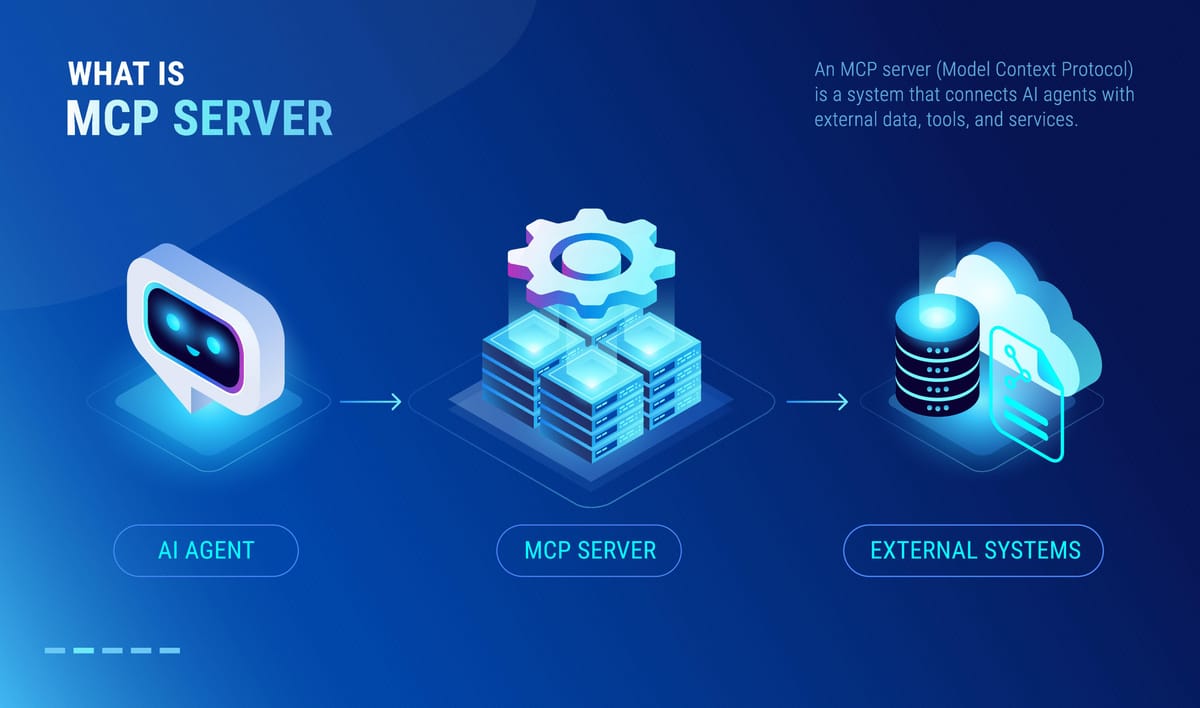
MCP is an open standard from Anthropic that defines how AI agents discover and call external tools and data. People love the "USB-C for AI" line. I prefer a blunter one: it's the contract that lets a model talk to your code without you inventing a new protocol every time.
The part that matters for us: the C# SDK is a Microsoft and Anthropic collaboration (modelcontextprotocol/csharp-sdk). Not a community wrapper. It has first-class .NET hosting, dependency injection, and the same Microsoft.Extensions.Hosting patterns you already use. These are the same MCP servers I wire into the Copilot desktop app in my daily workflow -- except here we're building the server, not consuming one.
MCP gives you three primitives, and each one maps onto something a .NET dev already knows:
- Tools -- callable methods the agent can invoke. Think API actions.
GetOrdersByCustomer(int id). - Resources -- readable data the agent can fetch. Think GET endpoints. Your schema, a document, a config blob.
- Prompts -- reusable templates. Less relevant for database work, so I'll skip them here.
Here's the replacement math. The old stack to let an LLM read your orders table:
Controller -> DTO -> AutoMapper -> Auth filter -> OpenAPI doc -> custom LLM tool-calling adapter -> DB
The MCP version:
One attributed C# class -> DB
That's the whole pitch. Let's build it.
Setting Up the Server and Your First Tool
I'm targeting .NET 10 (LTS) and C# 14 -- the current long-term-support line. Start with a console project and pull in the SDK.
dotnet new console -n EnterpriseMcp
cd EnterpriseMcp
dotnet add package ModelContextProtocol
dotnet add package Microsoft.Extensions.Hosting
The SDK plugs straight into the generic host. For a local agent -- Claude Desktop, the Copilot app, your own client -- you run over stdio. The agent launches your process and talks to it over standard in/out. No ports, no network.
using Microsoft.Extensions.Hosting;
using ModelContextProtocol;

var builder = Host.CreateApplicationBuilder(args);

builder.Services
    .AddMcpServer()
    .WithStdioServerTransport()
    .WithToolsFromAssembly();

await builder.Build().RunAsync();
WithToolsFromAssembly() scans for any class you've marked as a tool type and registers every tool method on it. Now define one. The key insight: the [Description] attribute is the contract the LLM reads. This isn't documentation for humans. It's how the model decides when and how to call your tool. Write it like you're briefing a smart but very literal junior dev.
using System.ComponentModel;
using ModelContextProtocol.Server;

[McpServerToolType]
public class TimeTools
{
    [McpServerTool]
    [Description("Gets the current UTC time. Use this when the user asks about the current date or time.")]
    public static string GetUtcNow()
        => DateTimeOffset.UtcNow.ToString("O");
}
Run dotnet run, point an MCP client at it, and the tool shows up -- discovered, described, callable. No route table, no Swagger, no client SDK. That's the baseline. Now the part you actually came for.
Safely Exposing the Database (the Part That Earns Trust)
This is where most "AI + your data" posts wave their hands. I won't. The first thing any senior engineer thinks when they hear "let an LLM read our database" is: not in production, mate. Good instinct. So let's make it safe by construction.
My rule: the model never writes SQL against a writable connection. Ever. Safety comes from layers, and the cheapest, strongest layer is the database itself.
Start with a read-only role. Before a single line of C#, create a Postgres user that physically cannot mutate anything.
CREATE ROLE mcp_reader LOGIN PASSWORD 'use-a-secret-manager';
GRANT CONNECT ON DATABASE enterprise TO mcp_reader;
GRANT USAGE ON SCHEMA public TO mcp_reader;
GRANT SELECT ON ALL TABLES IN SCHEMA public TO mcp_reader;
ALTER DEFAULT PRIVILEGES IN SCHEMA public GRANT SELECT ON TABLES TO mcp_reader;
Now even if everything above it has a bug, the worst an agent can do is read. SQL Server is the same idea -- a login mapped to a db_datareader-only user. I use both. The pattern is identical.
Pattern 1: Curated, parameterised tools
The safest tool is one where the LLM picks parameters, not SQL. Inject your data access via DI. The SDK respects the host container, so constructor injection just works.
using System.ComponentModel;
using Dapper;
using Npgsql;
using ModelContextProtocol.Server;

[McpServerToolType]
public class OrderTools(NpgsqlDataSource dataSource)
{
    [McpServerTool]
    [Description("Returns the most recent orders for a given customer. " +
                 "Use when asked about a specific customer's purchase history.")]
    public async Task<IEnumerable<OrderSummary>> GetRecentOrders(
        [Description("The customer's numeric ID.")] int customerId,
        [Description("Max rows to return (1-100). Defaults to 20.")] int limit = 20)
    {
        limit = Math.Clamp(limit, 1, 100);

        await using var conn = await dataSource.OpenConnectionAsync();
        return await conn.QueryAsync<OrderSummary>(
            """
            SELECT id, order_date, total_amount, status
            FROM orders
            WHERE customer_id = @customerId
            ORDER BY order_date DESC
            LIMIT @limit
            """,
            new { customerId, limit });
    }
}

public record OrderSummary(int Id, DateOnly OrderDate, decimal TotalAmount, string Status);
Register the data source once at startup, pointed at the read-only role:
builder.Services.AddNpgsqlDataSource(
    builder.Configuration.GetConnectionString("ReadOnlyDb")!);
The model can ask "show me customer 4471's recent orders." It cannot invent a DROP TABLE. The query is fixed, the inputs are clamped, the parameters are bound. This covers maybe 90% of real use cases, and it's boring on purpose.
Pattern 2: A constrained read-only query tool
Sometimes you genuinely want the agent to explore -- to answer questions you didn't pre-write a tool for. Fine. But cage it. Allow a single SELECT, force a read-only transaction, cap the rows, set a statement timeout.
[McpServerTool]
[Description("Runs a single read-only SELECT query against the analytics database. " +
             "Only SELECT is permitted. Results are capped at 200 rows.")]
public async Task<IEnumerable<IDictionary<string, object>>> RunReadOnlyQuery(
    [Description("A single SQL SELECT statement. No INSERT/UPDATE/DELETE/DDL.")] string sql)
{
    var trimmed = sql.TrimStart();
    if (!trimmed.StartsWith("SELECT", StringComparison.OrdinalIgnoreCase)
        || trimmed.Contains(';'))
    {
        throw new InvalidOperationException("Only a single SELECT statement is allowed.");
    }

    await using var conn = await dataSource.OpenConnectionAsync();
    await using var tx = await conn.BeginTransactionAsync();           // read-only by role
    await using var cmd = new NpgsqlCommand("SET statement_timeout = 3000;", conn, tx);
    await cmd.ExecuteNonQueryAsync();

    var rows = await conn.QueryAsync(
        $"SELECT * FROM ({sql}) AS sub LIMIT 200", transaction: tx);

    return rows.Cast<IDictionary<string, object>>();
}
That string check is the weakest guardrail. Treat it as a courtesy, not a defence. The real protection is that mcp_reader has no write grant, and the transaction hard-fails any mutation. Defence in depth. Never trust the model to behave.
Expose the schema as a Resource
Don't write a data dictionary by hand. Hand the agent the schema as a Resource and let it introspect.
[McpServerResourceType]
public class SchemaResources(NpgsqlDataSource dataSource)
{
    [McpServerResource(UriTemplate = "schema://tables", Name = "Database schema")]
    [Description("Lists all tables and columns the agent is allowed to read.")]
    public async Task<string> GetSchema()
    {
        await using var conn = await dataSource.OpenConnectionAsync();
        var cols = await conn.QueryAsync(
            """
            SELECT table_name, column_name, data_type
            FROM information_schema.columns
            WHERE table_schema = 'public'
            ORDER BY table_name, ordinal_position
            """);
        return string.Join("\n", cols.Select(c =>
            $"{c.table_name}.{c.column_name} :: {c.data_type}"));
    }
}
Register resources alongside tools:
builder.Services
    .AddMcpServer()
    .WithStdioServerTransport()
    .WithToolsFromAssembly()
    .WithResourcesFromAssembly();
Now the agent reads schema://tables, learns your structure, and writes smarter queries against Pattern 2 -- without you maintaining a single line of documentation.
My read-only safety checklist:
- Dedicated read-only DB role. The strongest layer. Do this first.
- Parameterised queries, always. Never string-concatenate agent input.
- Row caps and statement timeouts on every query path.
- No DDL, no DML.
SELECTonly, enforced by the role and not just the code. - Redact or exclude PII columns at the query level, not after the fact.
Hosting Over HTTP for Real, Shared Use
stdio is perfect on a developer's machine. For a server that multiple agents or services hit, you want HTTP with Server-Sent Events (SSE) -- the streamable HTTP transport. Switch the project to Microsoft.NET.Sdk.Web, add the ASP.NET package, and map the endpoint.
dotnet add package ModelContextProtocol.AspNetCore
var builder = WebApplication.CreateBuilder(args);

builder.Services.AddNpgsqlDataSource(
    builder.Configuration.GetConnectionString("ReadOnlyDb")!);

builder.Services
    .AddMcpServer()
    .WithHttpTransport()
    .WithToolsFromAssembly()
    .WithResourcesFromAssembly();

var app = builder.Build();

app.MapMcp();   // exposes the MCP endpoint over HTTP/SSE

app.Run();
That's a normal ASP.NET service now. Put it behind your existing auth -- an API key or OAuth bearer check in middleware -- lock it to your internal network, and deploy it like anything else. When I ship one of these, I let Aspire's deployment manifest model handle the pipeline so I'm not hand-writing YAML to push yet another service to the cloud.
No new ops story. It's a .NET web app that happens to speak MCP.
The Payoff: A Live Dashboard Over Legacy Data
Here's the reward, and the reason I care about keeping the backend this thin. An MCP server isn't just for chatbots. Point a small Angular dashboard at an agent that calls your server, and you get a live, queryable view over legacy data with almost no bespoke backend.
The flow: Angular component asks a natural-language question -> your agent endpoint -> the MCP tools above -> the read-only DB. The agent picks the right tool, you stream the result back.
// orders.component.ts (Angular 20) -- the thin client
@Component({
  selector: 'app-orders',
  template: `
    <input [(ngModel)]="question" placeholder="Ask about orders..." />
    <button (click)="ask()">Run</button>
    <pre>{{ result() | json }}</pre>
  `,
})
export class OrdersComponent {
  question = '';
  result = signal<unknown>(null);

  constructor(private http: HttpClient) {}

  ask() {
    this.http.post('/api/agent/query', { prompt: this.question })
      .subscribe(r => this.result.set(r));
  }
}
That's the whole frontend. No data layer, no per-question endpoint, no schema duplicated in TypeScript. The agent and the MCP server do the heavy lifting, and the UI stays clean. That's the point of doing the backend well -- good architecture is what lets the frontend be this simple.
Want it truly live instead of request/response? Swap the call for a push channel and stream updates as the data changes. I'll cover wiring a real-time dashboard with SignalR and Orleans in a follow-up.
You Didn't Build an API. You Exposed Your Data.
That's the shift. No controllers, no DTOs, no OpenAPI spec, no tool-calling adapter. You wrote a couple of attributed C# classes against a read-only database role, and now any MCP-aware agent can safely read your enterprise system.
Read-only by default. Parameterised. Capped. Agent-ready. Runnable this afternoon.
Clone the pattern, point it at your own database, and count how many lines of glue code you just deleted. That's your 75%.