Microsoft Agent Framework: Build AI Agents in C# with 5 Lines of Code

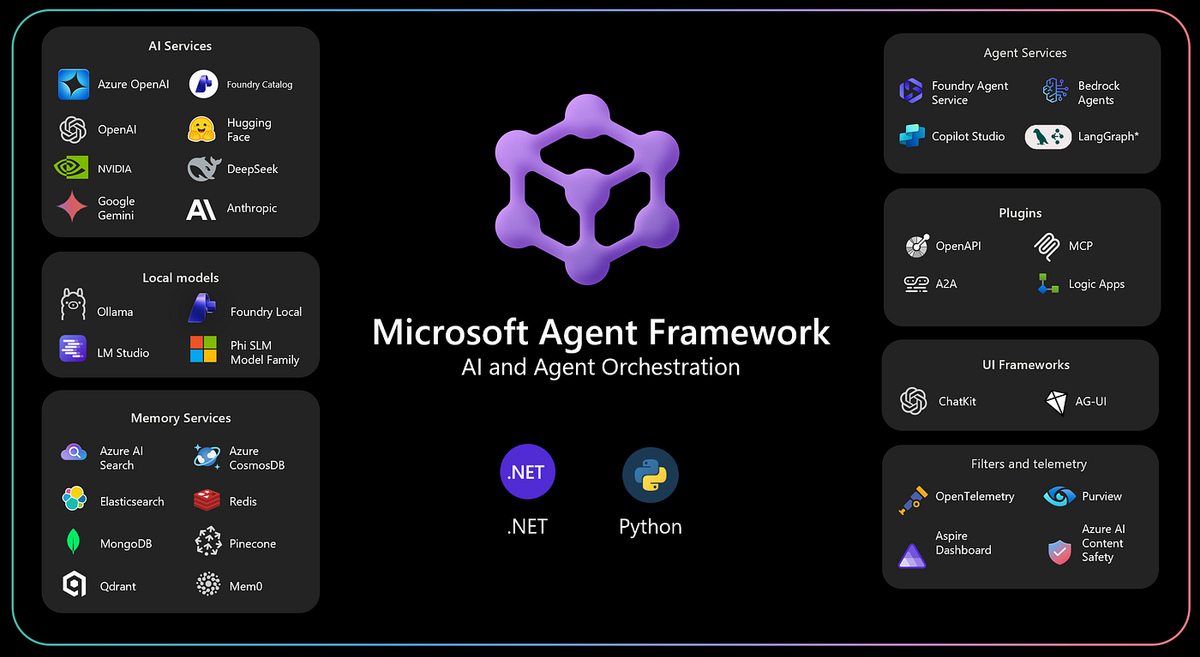
Microsoft finally killed the "which SDK do I use for agents?" problem.
If you've been watching the AI agent space from the .NET sidelines, confused by AutoGen's Python-first research vibe, or frustrated that Semantic Kernel felt awkward for multi-agent scenarios, your wait is over. At Build 2026, Microsoft shipped the Agent Framework: a single, unified .NET SDK that makes building AI agents feel as natural as registering a service in DI.
The core NuGet package is Microsoft.Agents.AI. It's at RC-1. The API is so clean it almost feels like cheating.
What the Agent Framework Actually Is
Agent Framework is Microsoft's unified answer for building autonomous AI agents in .NET. It sits on top of Microsoft.Extensions.AI and the IChatClient abstraction. If you've touched the new AI abstractions at all, you're already 80% there.
One package. One mental model. Works with any IChatClient provider:
- Azure OpenAI
- OpenAI direct
- Ollama (fully local, no API key)
- LM Studio
- Anthropic, Google, Amazon Bedrock
Swap one line to switch providers. Your agent code stays identical.
The framework replaces the fragmented approach of AutoGen for multi-agent, Semantic Kernel for single-shot" with a single API surface that handles everything from a basic chatbot to complex multi-agent orchestration.
Hello Agent / Five Lines, Done
Here's a complete AI agent in C#:
using Azure.AI.OpenAI;
using Azure.Identity;
using Microsoft.Agents.AI;

AIAgent agent = new AzureOpenAIClient(
        new Uri(Environment.GetEnvironmentVariable("AZURE_OPENAI_ENDPOINT")!),
        new AzureCliCredential())
    .GetChatClient("gpt-4o-mini")
    .AsAIAgent(instructions: "You are a friendly assistant. Keep your answers brief.");

Console.WriteLine(await agent.RunAsync("What is the largest city in France?"));
That's it. AsAIAgent() wraps any IChatClient into a full agent with instructions, name, and conversation management. Under the hood, Agent Framework handles message formatting, tool call loops, and response extraction. You just call RunAsync().
Think of AsAIAgent() as the AI equivalent of AddDbContext(). One extension method that unlocks the entire capability set.
Function Tools: Give Your Agent C# Methods
The real power kicks in when you give agents tools. Define a plain C# method, slap a [Description] attribute on the parameters, and the agent calls it on its own:
using System.ComponentModel;
using Azure.AI.OpenAI;
using Azure.Identity;
using Microsoft.Agents.AI;
using Microsoft.Extensions.AI;

string GetWeather(
    [Description("The city or location to get weather for")] string location)
    => $"The weather in {location} is sunny with a high of 22°C.";

string GetTime(
    [Description("The timezone, e.g. 'UTC' or 'Europe/Amsterdam'")] string timezone)
    => $"The current time in {timezone} is 14:32.";

AIAgent agent = new AzureOpenAIClient(
        new Uri(Environment.GetEnvironmentVariable("AZURE_OPENAI_ENDPOINT")!),
        new AzureCliCredential())
    .GetChatClient("gpt-4o-mini")
    .AsAIAgent(
        instructions: "You are a helpful assistant with access to weather and time information.",
        tools:
        [
            AIFunctionFactory.Create(GetWeather),
            AIFunctionFactory.Create(GetTime)
        ]);

Console.WriteLine(await agent.RunAsync(
    "What is the weather in Amsterdam, and what time is it there?"));
Output: The weather in Amsterdam is sunny with a high of 22°C, and the current time there is 14:32.
The agent decides when to call your functions. You don't write routing logic. You don't parse JSON tool calls manually. Agent Framework handles the entire call/result cycle, including multi-step chains where the agent needs to call several tools before synthesising an answer.
Sequential Workflows: Chain Agents Like Middleware
This is where things get genuinely exciting. AgentWorkflow lets you chain specialised agents into a pipeline where each agent's output feeds the next:
using Azure.AI.OpenAI;
using Azure.Identity;
using Microsoft.Agents.AI;
using Microsoft.Agents.AI.Workflows;

var client = new AzureOpenAIClient(
    new Uri(Environment.GetEnvironmentVariable("AZURE_OPENAI_ENDPOINT")!),
    new AzureCliCredential());

AIAgent researchAgent = client.GetChatClient("gpt-4o-mini")
    .AsAIAgent(
        instructions: "You research topics thoroughly and produce concise bullet-point summaries of key facts.",
        name: "Researcher");

AIAgent writerAgent = client.GetChatClient("gpt-4o-mini")
    .AsAIAgent(
        instructions: "Using the research notes provided, write a clear, engaging blog post with an introduction, body, and conclusion.",
        name: "Writer");

AIAgent editorAgent = client.GetChatClient("gpt-4o-mini")
    .AsAIAgent(
        instructions: "Review the blog post for clarity, grammar, and flow. Return the improved final version only.",
        name: "Editor");

var workflow = new AgentWorkflow()
    .AddSequential(researchAgent, writerAgent, editorAgent);

var result = await workflow.RunAsync("Write a blog post about the history of the Eiffel Tower.");
Console.WriteLine(result.Text);
The pipeline: User prompt -> [Researcher] -> bullet points -> [Writer] -> draft -> [Editor] -> polished post
One RunAsync() call. Three specialised agents. Context propagates automatically. This kind of multi-step AI workflow used to require hundreds of lines of orchestration code. Now it's a dozen.
Multi-Agent Orchestration: The Agent-as-Tool Pattern
This is the crown jewel. Call .AsAIFunction() on any agent to turn it into a tool another agent can invoke:
using System.ComponentModel;
using Azure.AI.OpenAI;
using Azure.Identity;
using Microsoft.Agents.AI;
using Microsoft.Extensions.AI;

string GetWeather(
    [Description("The city or location")] string location)
    => $"The weather in {location} is sunny with a high of 22°C.";

string GetHeadlines(
    [Description("News category, e.g. 'technology', 'sports'")] string category)
    => $"Top {category} headline: 'Major breakthrough in {category} sector today.'";

var azureClient = new AzureOpenAIClient(
    new Uri(Environment.GetEnvironmentVariable("AZURE_OPENAI_ENDPOINT")!),
    new AzureCliCredential());

AIAgent weatherAgent = azureClient.GetChatClient("gpt-4o-mini")
    .AsAIAgent(
        instructions: "You are a weather specialist. Use your tools to provide weather information.",
        name: "WeatherAgent",
        description: "Handles all weather-related questions.",
        tools: [AIFunctionFactory.Create(GetWeather)]);

AIAgent newsAgent = azureClient.GetChatClient("gpt-4o-mini")
    .AsAIAgent(
        instructions: "You are a news specialist. Use your tools to retrieve the latest headlines.",
        name: "NewsAgent",
        description: "Handles all news and current events questions.",
        tools: [AIFunctionFactory.Create(GetHeadlines)]);

AIAgent orchestrator = azureClient.GetChatClient("gpt-4o-mini")
    .AsAIAgent(
        instructions: """
            You are a helpful assistant. For weather questions delegate to the WeatherAgent.
            For news questions delegate to the NewsAgent.
            Combine their answers into a single coherent response.
            """,
        tools:
        [
            weatherAgent.AsAIFunction(),
            newsAgent.AsAIFunction()
        ]);

Console.WriteLine(await orchestrator.RunAsync(
    "What's the weather in Amsterdam, and what are the top technology headlines today?"));
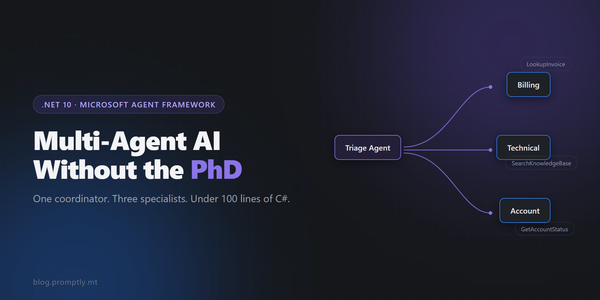
The orchestrator decides at runtime which agents to call, in what order, how many times. Unlike the sequential workflow, this is dynamic. The LLM picks the routing strategy based on the user's actual request.
Run It Locally with Ollama -- Zero Cloud, Zero Cost
Every example above works identically with Ollama. Just swap the client creation:
using Microsoft.Agents.AI;
using OllamaSharp;

AIAgent agent = new OllamaApiClient(new Uri("http://localhost:11434"), "llama3.2")
    .AsAIAgent(
        instructions: "You are a helpful assistant running locally via Ollama.",
        name: "LocalAgent");

Console.WriteLine(await agent.RunAsync("What is the largest city in France?"));
Same AsAIAgent(). Same RunAsync(). Same tool calling, streaming, and multi-agent support. No API key, no data leaving your machine, no cost per token. If you've been experimenting with local multi-agent AI setups, this is a massive upgrade in developer experience.
What Else Is Baked In
Beyond the core agent API, the framework ships with:
- Streaming --
RunStreamingAsync()withawait foreachfor real-time token delivery - Structured Output --
RunAsync<T>()constrains the model to return typed C# objects - MCP Integration -- connect agents to any Model Context Protocol server for external tool access
- OpenTelemetry --
.UseOpenTelemetry()gives you distributed traces through your existing dashboards - Agent Memory --
ChatHistoryMemoryProviderfor persistent context across sessions - RAG -- built-in
TextSearchProviderfor grounding responses in your documents
When to Use This vs. Semantic Kernel
Quick decision framework:
- Single-shot prompts, RAG pipelines, plugins without autonomy -> Semantic Kernel is still great
- Autonomous agents, tool calling, multi-agent orchestration -> Agent Framework
- Python-first research/experimentation -> AutoGen (now community-driven)
- Production .NET agents in 2026 -> Agent Framework, full stop
Microsoft hasn't deprecated Semantic Kernel. It's still actively maintained for its core use cases. But for anything involving autonomous agent behaviour, Agent Framework is now the official path forward.
Ship Something This Week
Here's my challenge: pick one repetitive workflow in your codebase or team process. Something you do manually that follows a predictable pattern. Build an agent for it.
The barrier to entry is now a single NuGet package and a handful of C# lines. The Agent Framework docs have a dozen annotated examples covering every pattern from hello-world to production customer support bots.
dotnet add package Microsoft.Agents.AI --prerelease
Stop overthinking the AI agent toolchain. Install the package, wrap your IChatClient, give it tools, and ship. The API is designed for .NET developers who want to build, not researchers who want to theorise.
If you're also using GitHub Copilot with MCP in your desktop workflow, these agents can plug directly into that ecosystem. The pieces are finally clicking together.