Playwright in .NET 10: Reliable E2E Tests, Then Let AI Drive the Browser

I've deleted more Selenium test suites than I've shipped. Fifteen years of StaleElementReferenceException, Thread.Sleep(3000) landmines all over the codebase, and CI pipelines nobody trusted. A red build meant "re-run it" long before it meant "something's broken". E2E testing in .NET was never a safety net. It was a second product you maintained out of guilt.
Two things changed that for me. Playwright made browser tests reliable enough that a red build means something again. And the Playwright MCP server solved a problem I didn't expect to solve this decade: my AI assistant can now open a real browser, drive my locally running ASP.NET Core app, read the console and network traffic, and write the tests itself.
This post covers both halves. First, Playwright in .NET 10 from zero to a real test suite. Then, wiring up MCP so your agent gets eyes and hands.
Playwright in .NET 10: Setup in Five Minutes
Playwright ships first-class .NET bindings. The smoothest path is NUnit via the Microsoft.Playwright.NUnit package, which gives you base classes like PageTest that handle the browser lifecycle for you. xUnit and MSTest variants exist too (Microsoft.Playwright.Xunit and Microsoft.Playwright.MSTest), but NUnit has the least ceremony, so that's what I use here.
dotnet new nunit -n MyApp.E2E
cd MyApp.E2E
dotnet add package Microsoft.Playwright.NUnit
dotnet build
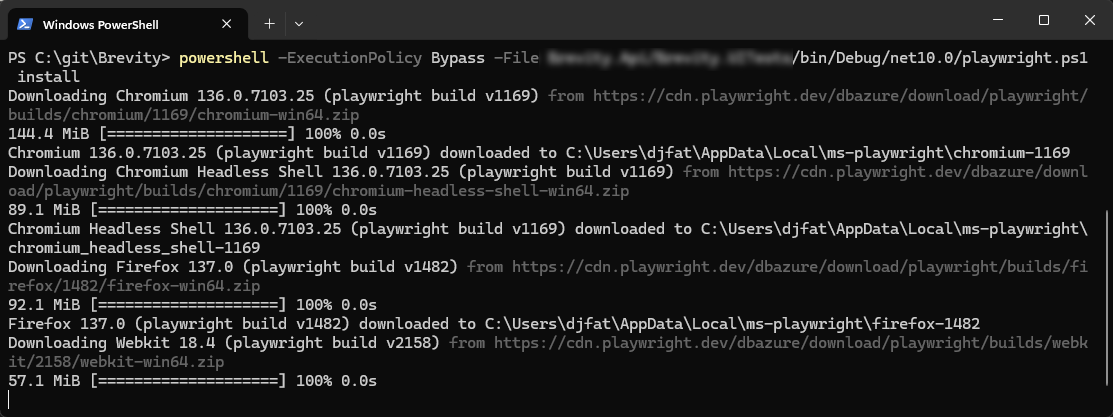
Now the gotcha that trips up everyone the first time: you must build before installing browsers. The install script doesn't exist until the build drops it into your output folder.
pwsh ./bin/Debug/net10.0/playwright.ps1 install
OR
pwsh powershell -ExecutionPolicy Bypass -File ./bin/Debug/net10.0/playwright.ps1 install
If you'd rather not remember that path, install the global CLI tool once and forget about it:
dotnet tool install --global Microsoft.Playwright.CLI
playwright install
Here's a complete minimal test. Inherit from PageTest and you get a ready Page. No browser setup, no teardown, no driver binaries to babysit:
using Microsoft.Playwright;
using Microsoft.Playwright.NUnit;

namespace MyApp.E2E;

[Parallelizable(ParallelScope.Self)]
[TestFixture]
public class SmokeTests : PageTest
{
    [Test]
    public async Task HomePage_HasCorrectTitle()
    {
        await Page.GotoAsync("https://localhost:5001");

        await Expect(Page).ToHaveTitleAsync(new Regex("MyApp"));
    }
}
That test runs against Chromium, Firefox, and WebKit from the same API. WebKit is the underrated one: Safari-engine coverage without maintaining a Mac farm. Set the browser via the BROWSER environment variable or a runsettings file and your entire suite goes cross-browser with zero code changes.
Five minutes, one real test, three browser engines. I've lost whole days to Selenium Grid configuration. You can already see where the 75% is coming from.
Why Playwright Actually Ended the Flaky-Test Era
Flakiness was never really the tests' fault. Selenium asked you to guess when the app was ready, and every wrong guess became a Thread.Sleep or a WebDriverWait with a hand-tuned timeout. Playwright inverted the model: auto-waiting locators and web-first assertions retry until the condition is true or the timeout hits.
One line replaces the entire wait-poll-retry dance:
await Expect(Page.GetByRole(AriaRole.Button, new() { Name = "Sign in" }))
    .ToBeEnabledAsync();
That assertion keeps re-checking the DOM until the button is enabled. No sleep. No explicit wait. No race between your assertion and your JavaScript framework's render cycle. The Selenium equivalent was six lines of WebDriverWait boilerplate wrapped in a try/catch that I copy-pasted between projects for a decade. I'm not proud of it.
Here's a real login flow, the shape of test I write most:
[Test]
public async Task Login_WithValidCredentials_ShowsDashboard()
{
    await Page.GotoAsync("https://localhost:5001/login");

    await Page.GetByLabel("Email").FillAsync("[email protected]");
    await Page.GetByLabel("Password").FillAsync("S3cure!Passw0rd");
    await Page.GetByRole(AriaRole.Button, new() { Name = "Sign in" }).ClickAsync();

    await Expect(Page).ToHaveURLAsync(new Regex(".*/dashboard"));
    await Expect(Page.GetByRole(AriaRole.Heading, new() { Name = "Welcome back" }))
        .ToBeVisibleAsync();
}
Notice what's not here: no CSS selectors, no XPath, no #login-form > div:nth-child(2) > input. GetByLabel and GetByRole target the page the way a user (or a screen reader) perceives it. This is where my design side and my testing side finally agree: accessible markup makes tests better. If GetByLabel("Email") can't find your input, your <label> association is broken. You failed real users before you failed the test. Good UX and good tests come from the same discipline.
Network interception is the feature I wanted most in the Selenium years. Testing the "payment failed" UI path used to mean poking a staging backend into a broken state. Now you mock the response in the test itself:
[Test]
public async Task Checkout_WhenPaymentFails_ShowsErrorBanner()
{
    await Page.RouteAsync("**/api/payments", async route =>
    {
        await route.FulfillAsync(new()
        {
            Status = 402,
            ContentType = "application/json",
            Body = """{"error": "card_declined"}"""
        });
    });

    await Page.GotoAsync("https://localhost:5001/checkout");
    await Page.GetByRole(AriaRole.Button, new() { Name = "Pay now" }).ClickAsync();

    await Expect(Page.GetByRole(AriaRole.Alert))
        .ToContainTextAsync("Your card was declined");
}
No live backend, no test data gymnastics, fully deterministic.
And when something does fail in CI, tracing is a time-travel debugger. Wrap the test in a trace and Playwright records every action, DOM snapshot, console message, and network request:
await Context.Tracing.StartAsync(new()
{
    Screenshots = true,
    Snapshots = true,
    Sources = true
});

// ... run your test steps ...

await Context.Tracing.StopAsync(new() { Path = "trace.zip" });
Open trace.zip in the trace viewer and you scrub through the failure frame by frame. Headless mode is the default in CI, so this all runs on a plain build agent with nothing installed but the browsers.
One more tool worth knowing: codegen. Run it against your local app and Playwright records your clicks as C# code:
playwright codegen https://localhost:5001 --target csharp
Great scaffolding, terrible final code. Recorded selectors are brittle and the output needs cleanup. Which is exactly why the second half of this post exists. There's now a better way to author tests than recording your own mouse.
The Playwright MCP Server: Give Your AI Assistant Eyes and Hands
MCP, the Model Context Protocol, is a standard way to hand tools to an LLM. The @playwright/mcp package hands it a browser. I've written about building your own MCP server in C# to expose databases to agents; this is the same idea, except the "database" is a live browser session against your app.
Here's the key insight, and it deserves real attention: the Playwright MCP server works on accessibility snapshots, not screenshots. When your agent calls browser_snapshot, it gets back the page's accessibility tree: a structured, textual representation of every role, label, and state on the page. No vision model squinting at pixels. No "I think that's a button". The result is fast, deterministic, and cheap on tokens. Structured input in, structured actions out. Exactly the diet an LLM thrives on.
This also closes the loop on the design thread from earlier. The same accessible markup that makes your GetByRole locators reliable is what makes your app legible to an AI agent. Semantic HTML is now a machine interface.
Setup is one command (it needs Node.js 18+):
npx @playwright/mcp@latest
For VS Code with Copilot in agent mode, add it to your MCP config:
{
  "mcpServers": {
    "playwright": {
      "command": "npx",
      "args": ["@playwright/mcp@latest"]
    }
  }
}
For Claude Code, it's a one-liner:
claude mcp add playwright npx @playwright/mcp@latest
Claude Desktop, Cursor, and Copilot CLI all follow the same pattern: point them at the same command and args. If you're new to running agents with MCP servers, my Copilot desktop MCP workflow post covers how these pieces fit together day to day.
Once connected, the agent gets a serious tool surface: browser_navigate, browser_click, browser_type, browser_fill_form, browser_evaluate, browser_console_messages, browser_network_requests, browser_tabs, browser_wait_for, and browser_take_screenshot. Basically everything you'd do in DevTools, exposed as callable tools.
A few config flags worth knowing before you need them:
--headlessfor no visible browser window (CI, or you just don't want the flicker)--browserto pick chromium, firefox, or webkit--isolatedfor an in-memory session; the default is a persistent profile, which keeps cookies and logins between runs--storage-stateto load a saved auth state so the agent starts logged in--test-id-attributeto match yourdata-testidconvention--device,--viewport-size, and--capsfor device emulation, window dimensions, and extras like vision, PDF, or devtools
The --storage-state flag alone saves enormous friction. Export your logged-in state once from a Playwright test, and every agent session starts past the login wall.
Real Workflows: What Changes When the Agent Can Drive Your App
The difference is easiest to show as before and after.
The verify-your-own-fix loop. Before: the agent edits a Razor page, says "I made the change, please test it", and you become its QA department. Click through, screenshot the error, paste it back, repeat. After: the agent edits the page, calls browser_navigate to https://localhost:5001, clicks through the flow, reads browser_console_messages and browser_network_requests, and reports "I made the change, drove the UI, the console is clean, and the API returned 200. Here's proof." The feedback loop that used to route through you now closes itself.
Self-writing E2E tests. This is the codegen replacement I hinted at. Instead of recording your mouse, the agent explores the page through the accessibility tree, sees the actual roles and labels, and picks proper GetByRole/GetByLabel locators. The resilient kind, not the brittle recorded selectors codegen produces. Then it hands you a complete C# test file in your project's conventions. Point it at your checkout page and ask for coverage of the happy path plus the declined-card path. Review the diff like any PR.
Self-healing tests. A redesign renames "Sign in" to "Log in" and three tests go red. Before, you'd grep for the string and hope. Now the agent opens the page, re-snapshots the accessibility tree, sees the button's new accessible name, and updates the locator. The test heals with a one-line diff and an explanation.
Live bug reproduction. Paste a bug report ("checkout hangs after applying a discount code") and the agent reproduces it in a real browser while watching the console and network tab. It comes back with the failing request, the JS error, and a hypothesis, instead of asking you for reproduction steps you don't have.
One honest caveat. Microsoft also offers a Playwright CLI plus Skills approach for coding agents, which can be more token-efficient for one-shot tasks. MCP shines when you want an iterative, persistent browser session: the agent keeps state, stays logged in, and works the app over multiple turns. For the workflows above, that persistence is the whole point. And whichever client you use, the agent works far better with project context. Same reason I keep a tuned CLAUDE.md in every .NET project.
Two Steps, One Week
The upgrade path is simple. Today: adopt Playwright in .NET 10. The NuGet package, one PageTest class, browsers installed, first green run. Your E2E suite stops being the part of CI everyone ignores. This week: wire up the Playwright MCP server and let your agent drive the app it's editing.
That's the 75%. Less time hand-tuning selectors, babysitting flaky CI, and acting as QA for your own AI assistant. More time on architecture and UX, the work that actually needs you.
Start with the login-flow test from Section 2 against your own app. Then open your agent and type: "Open my app at https://localhost:5001 and write a Playwright test for the checkout flow." Watch it explore the accessibility tree, pick the locators, and hand you the file. The first time it works, you won't go back.